For shops that get a price list or a stock file
Price and stock updates from the supplier’s file, with every change shown first.
Whenever the supplier’s file arrives, someone types it into the shop. Drop it on Content Uploader instead: it finds each product by its SKU, lists the prices and quantities that would change, and writes them to your shop when you approve.
- Takes over the products your shop already has
- Stock is set to the number in the file
- A price that lost a digit waits for you
Cask Forty-Two · the importer’s latest allocation
Review firstallocation-list.csv
87 rows · 5 columns
- All 5 columns the configuration uses are present
- SKU column found: bottles matched by SKU
- Compared with what the shop holds now
- 87 prices and 87 quantities read
allocation-list.csv
87 rows checked against what the shop holds now
- New
- 0
- Updated
- 24
- Unchanged
- 63
- Errors
- 0
- Updated
Isle of Fael Cask Strength
Price
€95.00→ €89.00Changed on the destination since it was published
- Updated
Glen Harrow 1998 Vintage
Stock
10→ 12 - Updated
Glen Harrow 25 Year Old
Price
€1,450.00→ €145.00A large move: look at this one
Dropping the importer’s latest allocation.
An example: a fictional whisky merchant, Cask Forty-Two, and its importer’s allocation list.
What it does for a shop with a supplier
The supplier’s list goes on the shop, and you see it first.
Content Uploader is a web service for shops that are sent a price list or a stock file on a regular basis. You upload the file as it comes. It finds your products by their SKU, compares the list with what your shop holds today and shows what would change. The shop is updated only when you approve it, and the next list goes through the same setup.
The list as it arrives
An Excel or CSV file with the columns your supplier already uses. It can be as plain as a SKU, a price, a sale price and a stock quantity: a product that exists keeps its name and everything else the list does not set.
How prices and stock are readThe shop beside the file
The review reads your shop and shows its price and stock next to the list’s. Whatever changed on the shop since the list was drawn up, you see it before it is written over.
What if I change a price on my shop?A typo does not go live
A price that moves a long way, such as one that lost a digit, waits for your tick. Even a list that publishes itself waits for you then.
How the price check worksThe next list is the same drop
The columns are mapped once. The next list updates the same products, and a product that already matches the shop is not written again.
Upload the next file
From the first list to the next
What the review does when things do not go to plan.
Cask Forty-Two sells rare whisky, and the importer’s allocation lists keep coming. These scenes come from the Help Center’s tutorial and are told here with the merchant’s bottles. The pictures are the tutorial’s own: an example shop that sells outdoor gear, not the whisky merchant.
The first list
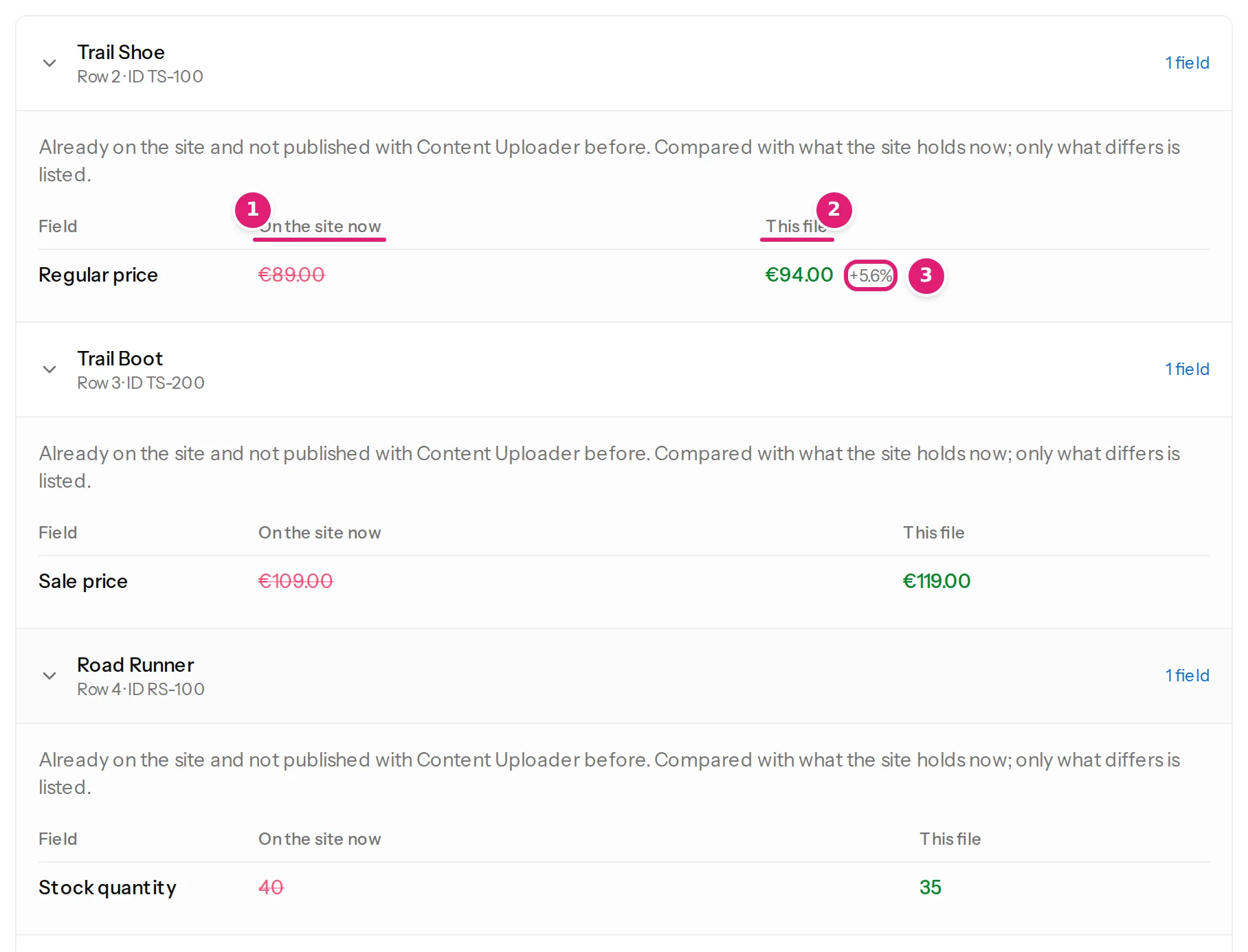
The first list takes over the bottles the shop already has
Cask Forty-Two’s bottles were entered by hand long before the first file. The importer’s list carries the same SKUs, so the first file updates those bottles instead of making a second set.
The review reads the shop and lists only what differs from it. A bottle that already matches is counted as unchanged, and nothing is sent for it. These bottles were not published with Content Uploader before, so the review asks you to tick that you looked. How the first list takes over products
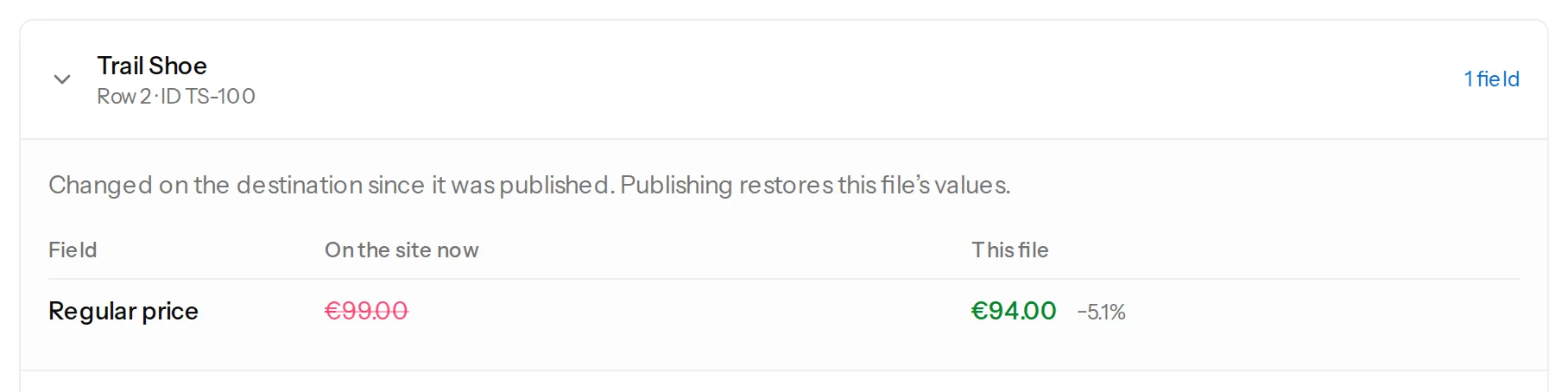
Changed on the shop
A price someone changed by hand is shown before it is put back
Between two lists a colleague put the Isle of Fael Cask Strength up by six euros on the shop. The importer’s list still says what it said before, so the file did not change, but the shop did. The review reads the shop and lists the bottle: “Changed on the destination since it was published. Publishing restores this file’s values.”
By default the file wins, and you see what would be put back before anything is. Each field can instead be compared only with the last list. What if I change a price on my shop by hand?
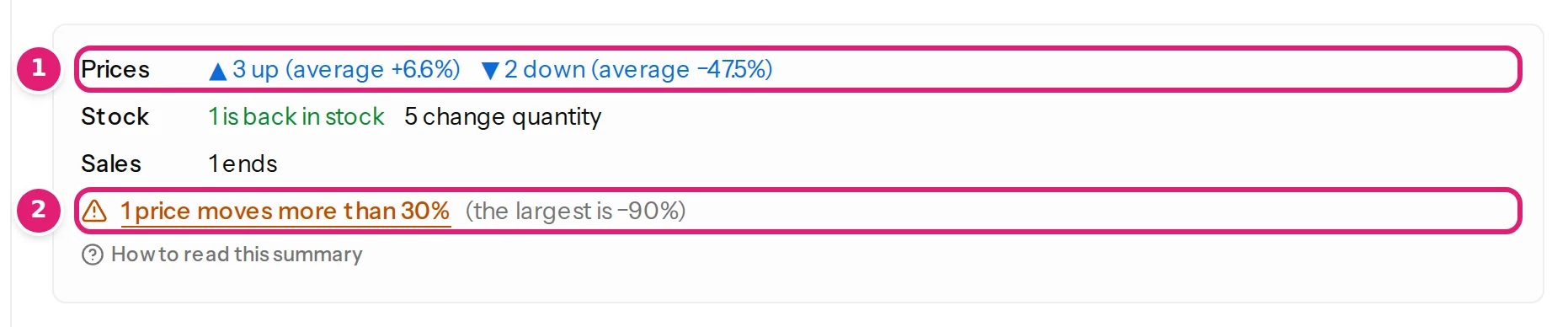
A lost digit
A price that lost a digit waits for you
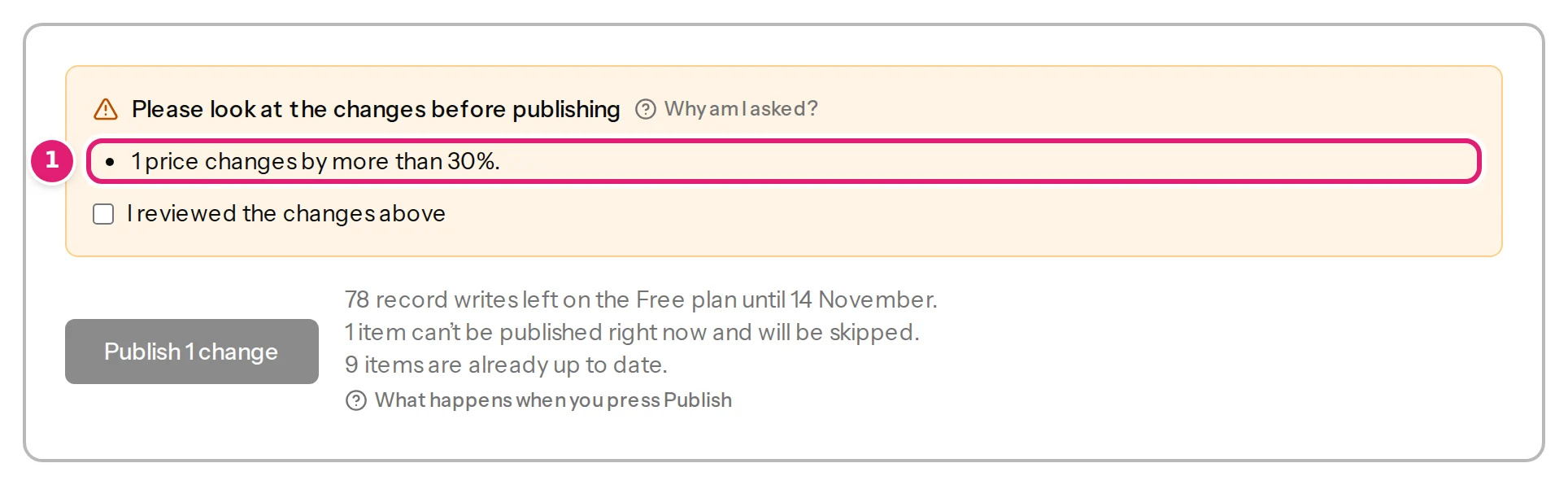
Glen Harrow 25 Year Old is €1,450.00 on the shop, and the new list says 145.00. A price that moves by more than 30% is marked “A large move: look at this one”, and the publish button waits until you tick that you looked.
Do not publish that file. Correct the number in your spreadsheet and drop it again: the next review has the right price. How the price check works
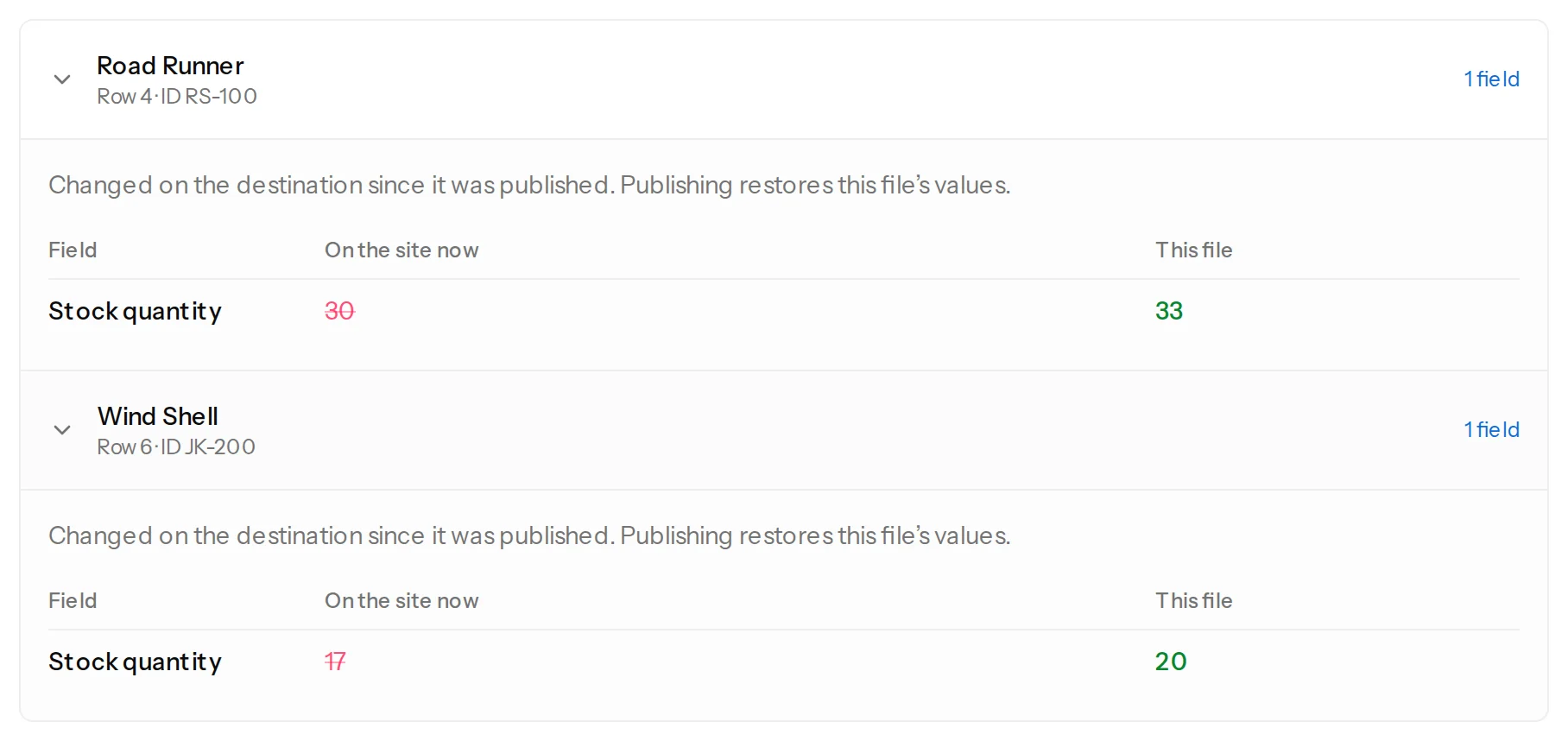
Sold between two files
Bottles sold since the list was drawn up stay sold
Two bottles of Glen Harrow 1998 Vintage were sold after the list was drawn up, so the shop holds 10 while the list says 12. By default the file’s number wins, so the review lists the bottle: publishing would put two sold bottles back on the shelf.
For stock, choose “Update it when the file changed since the last file”. A quantity is then written only when the file’s own number changes, and prices are still compared with the shop. What the shop’s value is compared with
When nothing is wrong
A clean list can publish itself
When you trust a configuration, set it to publish automatically. A list with nothing that needs a person is then checked and published without anyone pressing a button: no rows with errors, nothing skipped except products the shop cannot update, and no price beyond the limit.
A price that moves too far still waits, whatever the configuration says, and so does the first list after any change to the setup. Whoever uploaded the file is emailed. When a file is published without you
What the list costs by hand
How long does a list take you now?
Set the sliders to your own routine.
What is copy-paste costing you?
Move the sliders to match your work.
Time spent on manual updates
128hours a year
That’s about 3.2 working weeks of retyping prices and quantities into the shop. With Content Uploader, each update is one file drop and one review.
Get those hours backSaid plainly
What the routine does not include.
So that you do not find out after the first list.
A person drops each list
Nothing is fetched from a supplier’s web address, an inbox or a shared folder, and nothing runs on a schedule. Someone uploads each file. Publishing is the part that can run without you.
Prices stay in your shop’s currency
A price is a number in your shop’s currency. Nothing is converted, and a code for another currency is refused with the reason.
Bottles the list leaves out stay as they are
A product that is not in the list is not set to out of stock, hidden or deleted. Only the rows of the file are written.
Stock is set, not adjusted
A quantity becomes the number in the list. It is never added to or taken from a count read earlier, which is why each field has its own choice of what it is compared with.
Grouped products are left alone
A gift set built as a grouped product is named in the review and left as it is. The rest of the file goes on.
There is no undo button
An update is reversed by uploading a list with the previous values: the review shows the change in reverse. The review before you publish is the safety net.
Every known limitation, for any platform.
FAQ
Questions about price lists and stock files.
What shops ask before they connect one.
Does it work with the list as my supplier sends it?
Yes, if it is an Excel, OpenDocument or CSV file. You map its columns once, when you set up the configuration: a new one picks the columns whose names match a field and uses your SKU column as the record ID. A list can be as plain as SKU, price, sale price and stock, because a product that exists keeps its name and everything else the list does not set. Prices are read as the file writes them, with a decimal comma or a decimal point and with or without a currency symbol. A number that could mean two things, such as 1,299, is not guessed at: you say how the file writes numbers, or the row is refused with the reason.
What if the supplier renames a column?
The file stops before any row is read. The page says “This file doesn’t match the configuration”, lists the missing columns with the fields that use them, and nothing is processed. Rename the column back in your spreadsheet, or choose “Update mapping for this file” to point the field at the new name: the file is then checked again without a new upload. A column the supplier adds is harmless and is listed as not used. A column that disappeared since the last file always asks for a tick before publishing, even when everything required is there.
What if someone changes a price on the shop between two lists?
The review of the next list shows it. For every price, sale and stock quantity the list sets, it reads the shop, and a product whose value there differs from the list is shown as “On the site now” against “This file”. By default publishing puts the file’s value back, because the shop is meant to end up as the list says. For a field you can choose to compare only with the last list instead, so that a number changed on the shop stays until the list’s own number changes.
Do I have to be there when a list is published?
Not for a clean list. A configuration can publish a file on its own when nothing needs a person, and whoever uploaded the file is emailed that it was published. A list with a row that has an error, a price that moves too far, or the first list after any change waits for review, and that person is emailed that it needs them. A person still uploads each list: nothing is fetched or scheduled.
What does it cost to update 500 products?
Only the products a list actually changes count. A record write is one item created or updated on your shop. Checking, previews, products that already match, skipped items, rows with errors, failed attempts and retries are free, so a list in which most products are unchanged uses a write only for each one that changed. The button “Publish N changes” tells you exactly what a run will use before you press it, and what each plan includes is on the pricing page.
Spend the next list reading, not retyping.
Create a workspace, connect your shop and drop the next list from your supplier. Your shop stays as it is until you approve what the review shows.
All of this, with a picture of every step, is in the tutorial Update your shop’s prices and stock from a spreadsheet. Try it on a test shop with its example files: the first list, the second and the shop’s starting products.
Updating more than prices and stock? See what a WooCommerce shop can update. Choosing between tools? Content Uploader and WP All Import. What counts as a write, and what each plan includes: what counts as a record write and the pricing.