Dates that move by a few hours
A date without a time zone is read as UTC, and the site shows it in its own zone. The cell says which time it means once it carries the offset.
Dates are wrongFor a site that is moving to WordPress or Joomla
Your old system can export its articles as a spreadsheet. Map the columns once, keep every address, date and status, and publish the lot to WordPress or Joomla after a review that shows each article as it will be.
Marque & Mile · the archive, 2009 to 2026
Review firstmarque-and-mile-export.csv
1,800 rows · 8 columns
marque-and-mile-export.csv
1,800 rows checked against your site
The last of the carburettor GTs
Published 2 June 2011 · Road tests
Notes for a Delmare feature
Draft · Features
Row 413 · no title
Title: This field resolves to an empty value.
Dropping the archive’s export.
An example: the archive of a fictional motoring magazine, Marque & Mile, exported from its older system.
What it does for a move
Content Uploader is a web service that turns an export file into content on your WordPress or Joomla site. You say which column holds the title, the address, the text, the date and the status. It shows you each article as it will be published, and publishes the lot after your review.
The old system’s column names do not matter. You choose, once, which column holds the title, the address, the text, the date and the status.
How mapping worksThe address is read from a column, so it stays as it was. The date and the published or draft status of each article come from its row too.
Title, slug and aliasThe categories and tags that your new site does not have are listed before you publish, and created with their parents first.
CategoriesPreview any row before you save, and read each article as it will be published before the first one exists on the new site.
How the review worksThe columns, mapped once
The export has eight columns with the old system’s own names. Each field takes its column once, and every later file is read the same way.
idpost_namepost_titlepost_contentpost_datepost_statuscategory_nametag_list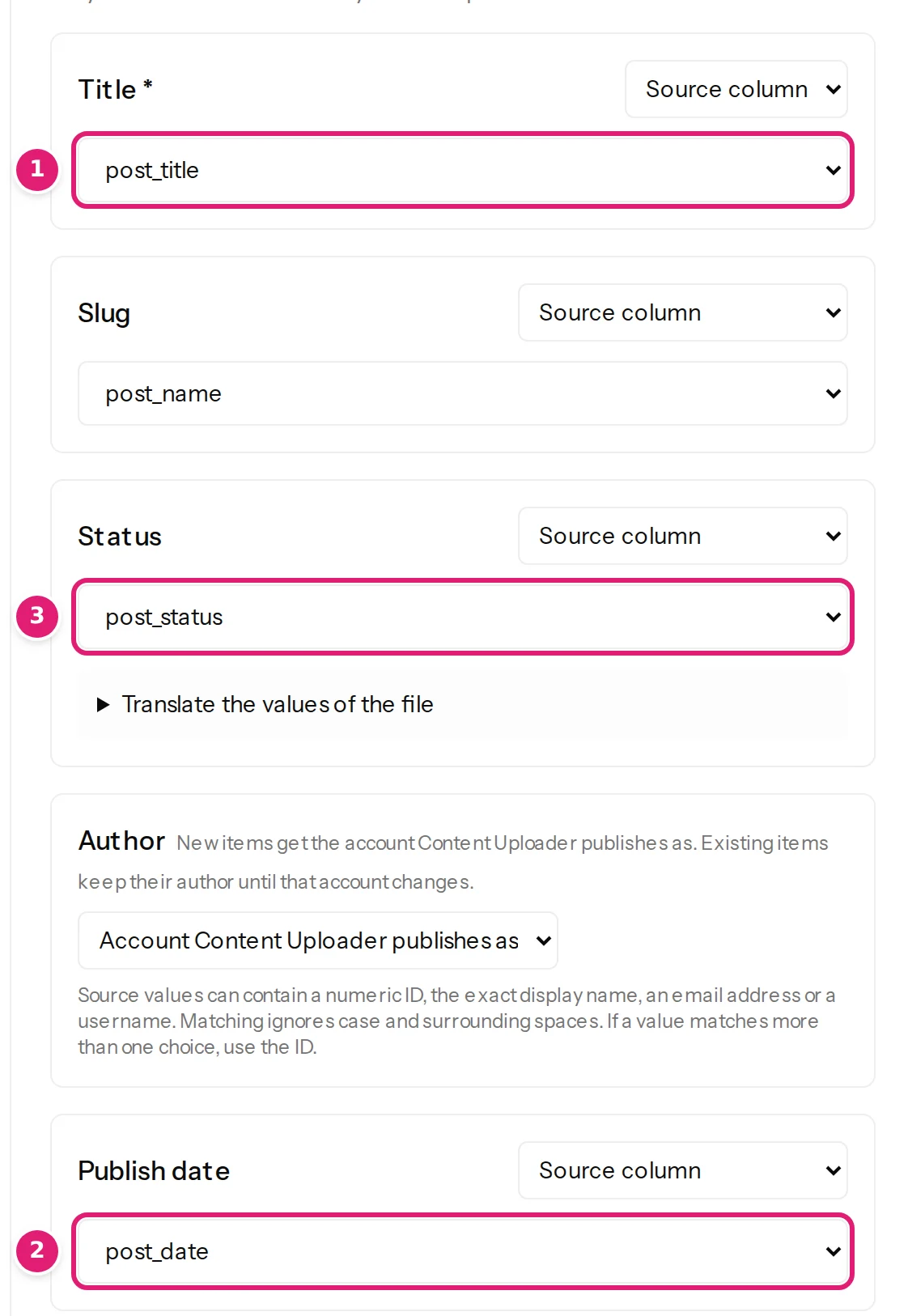
The picture is the Help Center’s, from the tutorial’s example magazine, which has its own five articles. Move articles from an older system
The traps of a move
Each one has an article of its own in the Help Center, so that you meet it on a test run and not on the live site.
A date without a time zone is read as UTC, and the site shows it in its own zone. The cell says which time it means once it carries the offset.
Dates are wrongA CSV has to be UTF-8. One saved in another encoding is refused rather than published garbled, and an Excel workbook has no such problem.
Character encodingA body cell can hold HTML. The site then applies its own filter, as it does for an editor, and images inside the text stay links.
HTML in cellsA file may have up to 10,000 rows. A larger archive is split into several files, each one reviewed and published.
Large filesA file that starts with data instead of column names is read by position, as Column A, Column B and so on, and the order of the columns then matters.
Files without a header rowA row with no title is reported with its row number and its reason, and the rest of the file goes on. Correct the rows and upload them again.
Rows with errorsRead it first
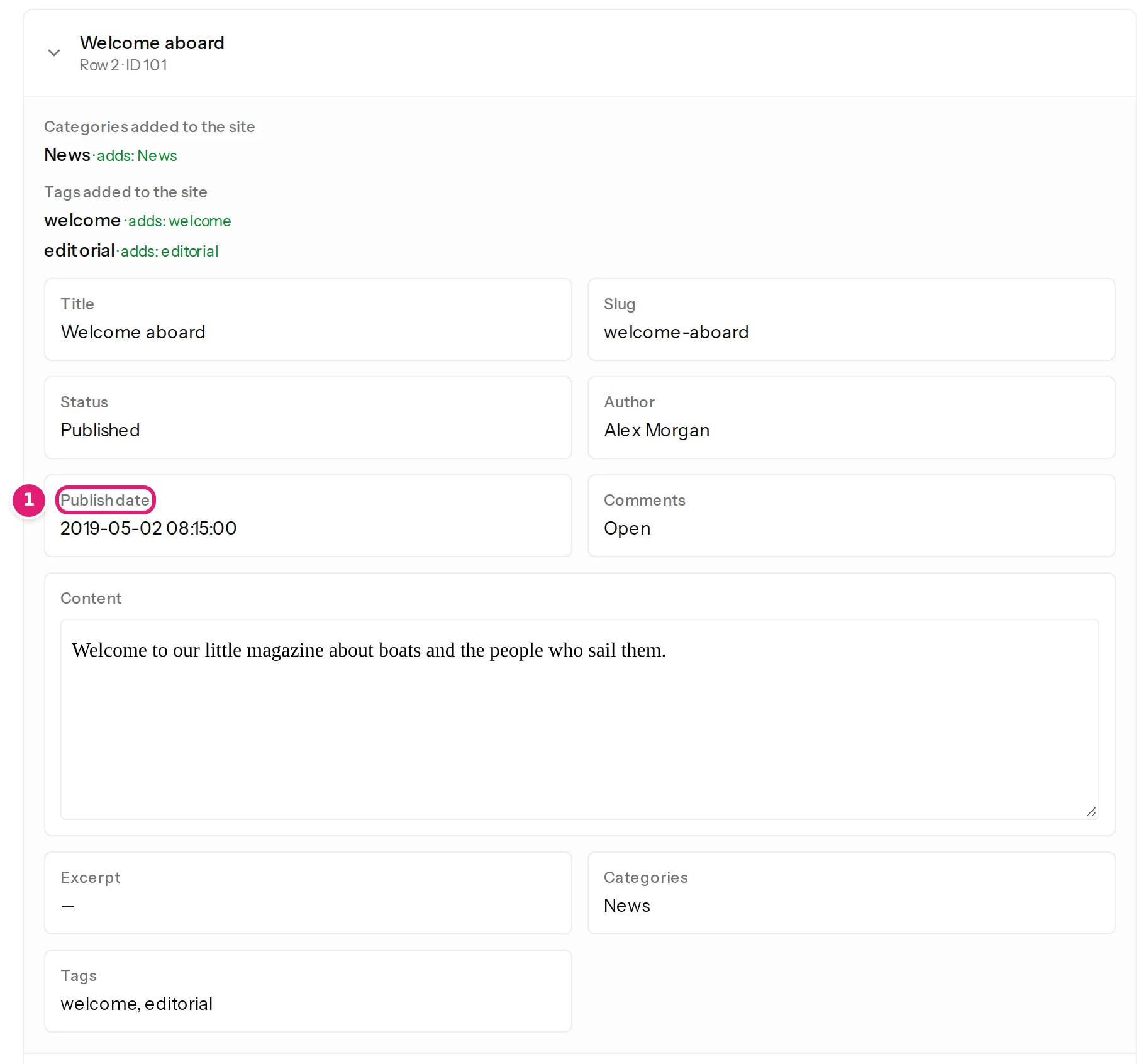
The review lists every article as new, with its slug, its status, its date, its category and its tags. The date is shown as it was read from the file, before the site applies its time zone, so a shift can be seen before anything is published.
The first file of a configuration always asks for a tick that you reviewed it. How the review works
The trap, and its fix
The file said 08:15. A site two hours ahead of UTC shows 10:15, because a date without a time zone is read as UTC. Adding the offset to the dates and dropping the file on the same card lists every article as updated, and publishing shows 08:15. Dates are wrong, shifted or refused


Said plainly
So that you do not plan around something it does not do.
Posts, pages and custom post types on WordPress, articles on Joomla. Comments, users, menus and the media library are not read or written.
Content Uploader reads Excel, OpenDocument and CSV files, and the first worksheet of a workbook. An export in XML has to become a spreadsheet first.
An image in an article’s HTML keeps pointing at its old address. The featured image comes from a column, as a file in a ZIP or as a web address.
The old system is not touched. On the new site, a file only creates and updates articles, so a mistake is corrected by uploading the corrected rows.
It moves the rows of a spreadsheet. A WordPress site that moves to another WordPress site is moved with the tools made for that.
Nothing is fetched from the old system. You export, save as CSV or Excel, and drop the file.
Every known limitation, for any platform.
FAQ
Short answers, with the articles behind them in the Help Center.
Yes. Map the slug (on Joomla, the alias) to the column that holds the old address, and the article keeps it. If a later file changes that column, the address changes too, and Content Uploader adds no redirect of its own. WordPress normally redirects a changed address of a published post; Joomla does not.
They can. A date without a time zone is read as UTC, and the site shows it in its own zone, so a date that says 08:15 can show 10:15 on a site two hours ahead of UTC. Add the offset to the dates in the file (for example 2019-05-02 08:15:00+02:00) and drop the file again on the same card: the articles are listed as updated and publishing puts the dates right.
A file may have up to 10,000 rows, and a spreadsheet at most 10 MB. An archive that is larger is split into several files, each with its own review.
Yes, and it is the safest way: connect a staging copy of the new site, publish the export there, and read the result. A staging copy counts as a site of its own, and so do its writes. Publish to the live site once the staging site looks right.
Yes. The old system’s number is each article’s record ID, so the same configuration updates the same articles whenever you drop a file with new values. Articles that someone writes by hand on the new site are not matched, because Content Uploader only recognises what it published itself.
Create a workspace, connect the new site, or a staging copy of it, and drop the export. Every article is listed before one of them exists.
Try the whole move on five articles with the tutorial Move articles from an older system and its example file 11-migration-export.csv. For Joomla, the tutorial Import one hundred articles into Joomla.
Moving to WordPress or Joomla. An export in XML rather than a spreadsheet? Content Uploader and WP All Import says which tool is for that.