Spring Sale 2027 › Competition cars
Lot 17: 1961 Castellane GT Spider
yoursite.com/lots/lot-17-1961-castellane-gt-spider/
- Year
- 1961
- Marque
- Castellane
- Estimate from
- £480,000
- Matching numbers
- Concours
Status: DraftRecord ID 17
WordPress 6.6 or later · the plugin connects, no password shared
Drop in the Excel or CSV file you already have. Content Uploader creates your posts, pages or custom post types from its columns, shows you every change before anything is written, and updates the same items from the next file.
Blackwell & Hart · Spring Sale 2027
Review firstspring-sale-catalogue.xlsx
64 rows · 11 columns
spring-sale-catalogue.xlsx
64 rows checked against what you published last time
Lot 17: 1961 Castellane GT Spider
Estimate from £450,000 → £480,000 · Estimate to £550,000 → £560,000
Lot 58: 1936 Linden Phaeton
New category: Spring Sale 2027 › Coachbuilt
Row 41 · Lot 40: 1967 Varga Tipo 12
Estimate from: The resolved value must be a number, such as 12 or 12.5.
Dropping the spring sale catalogue.
An example: the spring sale catalogue of a fictional auction house, Blackwell & Hart.
What it does for your site
Content Uploader is a web service that turns a spreadsheet into content on your WordPress site. You install a small plugin and approve the connection once. Then you drop an Excel or CSV file, and it creates or updates your posts, pages or custom post types, after showing you every change.
Title, address, status, author, date, text, excerpt, categories, tags, custom fields and a featured image, each from a column you choose, in files of up to 10,000 rows.
What a row can fillThe review lists what is new and what changes, field by field, and names every row with a problem. Nothing is written until you approve it, and new items start as drafts unless you say otherwise.
How the review worksYou map the columns once. The next file updates the items Content Uploader published and adds the new rows, and what did not change is left alone.
How it avoids duplicatesCategory paths such as Spring Sale 2027 › Competition cars, tags from one column or two, and photographs from a ZIP you drop with the file. Missing categories and tags can be created for you, parents first.
CategoriesHow it works for WordPress
Your site gets a small plugin. After that, the file is the only thing you bring each time.
Download the Content Uploader plugin ZIP from the Sites page, upload it in WordPress under Plugins and activate it. Then select Connect in Settings › Content Uploader and approve the connection as a workspace owner. No WordPress password is entered anywhere.
Choose Posts, Pages or a custom post type, then say which column becomes the title, the text, the categories and so on. Columns whose names match a field are chosen for you, and the preview shows any row as it will be published before you save.
The review shows what is new, what changes and which rows have a problem. When you approve it, publishing runs in the background and you are emailed when it has finished. The next file starts here.
What a row becomes
A page or a custom post type works the same way. The auction house’s lots are a custom post type: pick a lot to see what WordPress would get.
Every field and what it accepts: WordPress content types and fields.
spring-sale-catalogue.xlsx
Pick a row to preview
| Preview | Lot | Year | Marque | Model | Estimate from | Category | Tags |
|---|---|---|---|---|---|---|---|
| 17 | 1961 | Castellane | GT Spider | 480000 | Spring Sale 2027 > Competition cars | Matching numbers, Concours | |
| 18 | 1958 | Varga | Sport 750 | 310000 | Spring Sale 2027 > Competition cars | One owner, Matching numbers | |
| 24 | 1964 | Linden | Albany Coupé | 95000 | Spring Sale 2027 > Grand tourers | Concours | |
| 31 | 1972 | Delmare | Berlinetta | 140000 | Spring Sale 2027 > Grand tourers | One owner |
Title ← Lot {{ Lot }}: {{ Year }} {{ Marque }} {{ Model }}
Slug ← lot-{{ Lot }}-{{ Year }}-{{ Marque }}-{{ Model }}
Category ← Category, read as a path · Tags ← Tags, split on commas
Featured image ← Photo, from the ZIP · Custom fields ← Year, Chassis no., Estimate from, Estimate to
Preview · row 2
Nothing is written to your site
Spring Sale 2027 › Competition cars
yoursite.com/lots/lot-17-1961-castellane-gt-spider/
Status: DraftRecord ID 17
The title is Lot {{ Lot }}: {{ Year }} {{ Marque }} {{ Model }}, written once for every lot. Nothing here is written to a site. Custom post types appear when WordPress’s REST API makes them available and the connecting account may edit them.
What you set up once, and what you read each time
These pictures are from the Help Center’s tutorials: a sailing magazine, not the auction house above.
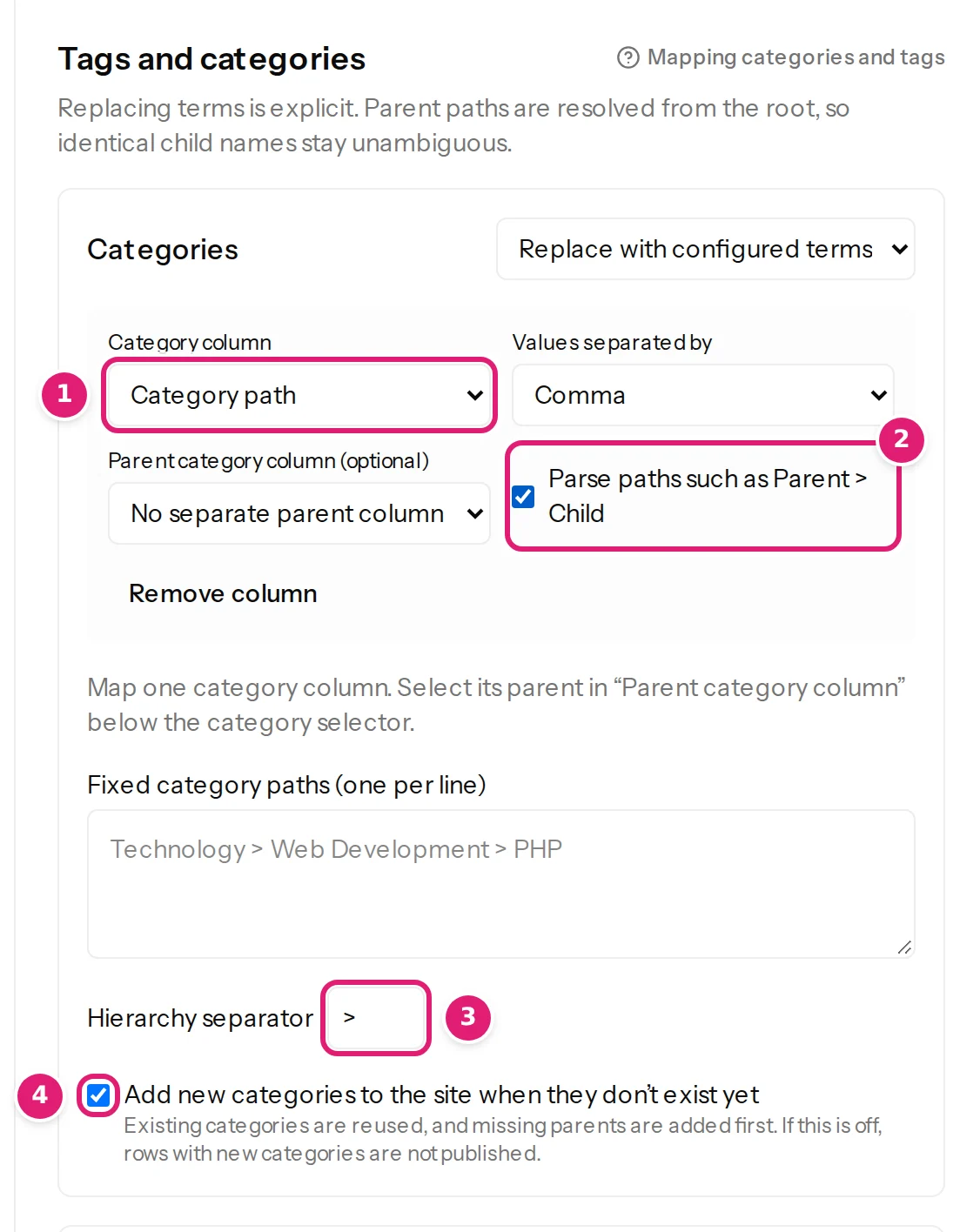
Categories and tags
Write the path with the parent first, Spring Sale 2027 > Competition cars, and the lot goes in the last level. The levels above it are used, or created, too. Tags work the same way, from one column or several, each with its own separator.
Before anything is created, the review lists the categories and tags it will make, with the parents they add, so a typo shows up as a stray new category while you can still fix the file.
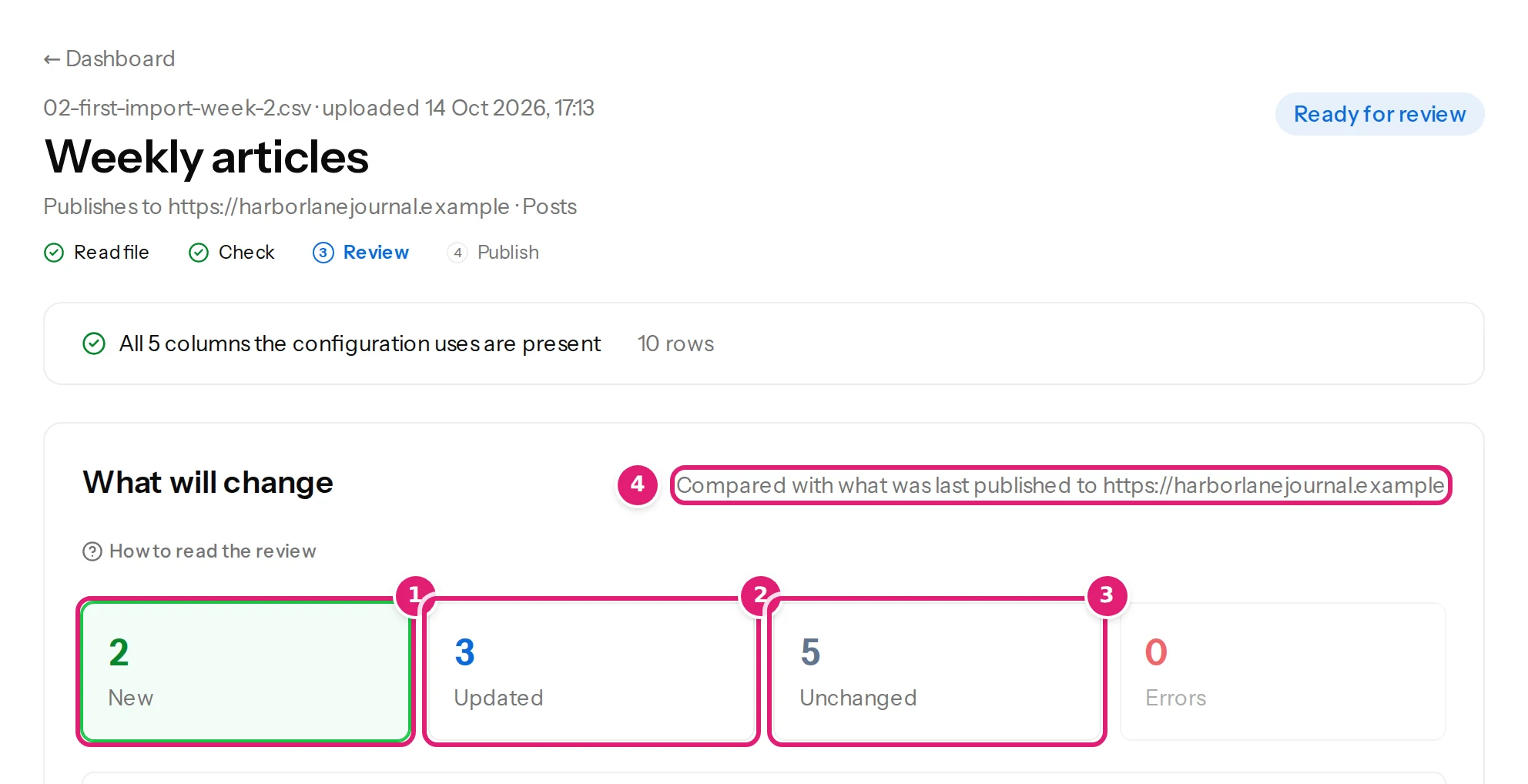
The next file
The second file of the Help Center’s example has ten rows. Two are new, three are updated and five are unchanged, so five rows are written. An updated item lists just the fields that change, with the value last published struck through.
Updating content that is already published · Update existing content from the next spreadsheet
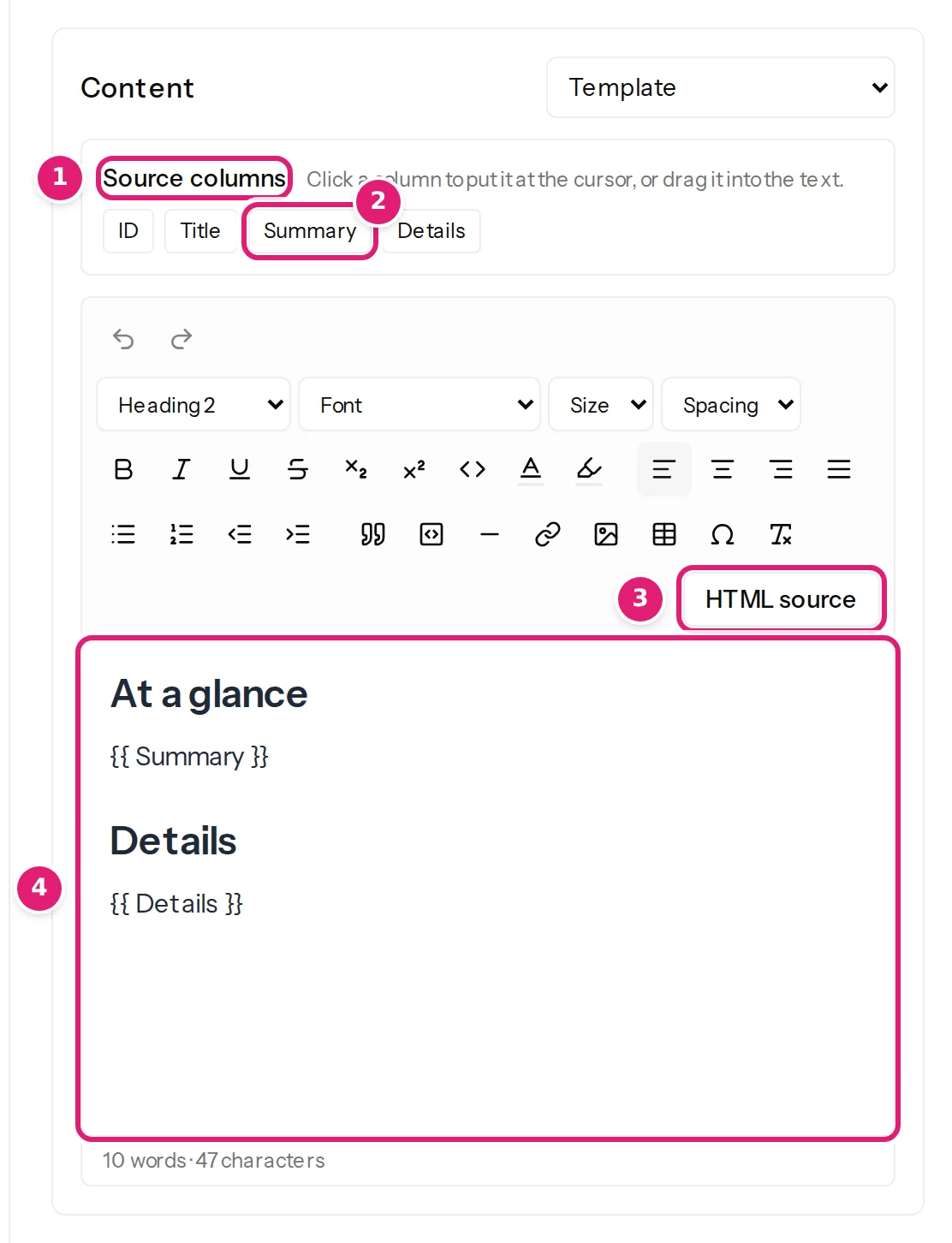
Titles, addresses and bodies
A title such as Lot {{ Lot }}: {{ Year }} {{ Marque }} {{ Model }} gives every row its own, and the same works for the address and the excerpt. For the text, a column that already holds HTML goes in as it is. Or write the body in an editor with a toolbar and drop columns where you want them.
Templates and placeholders · Content and HTML · Publish formatted text
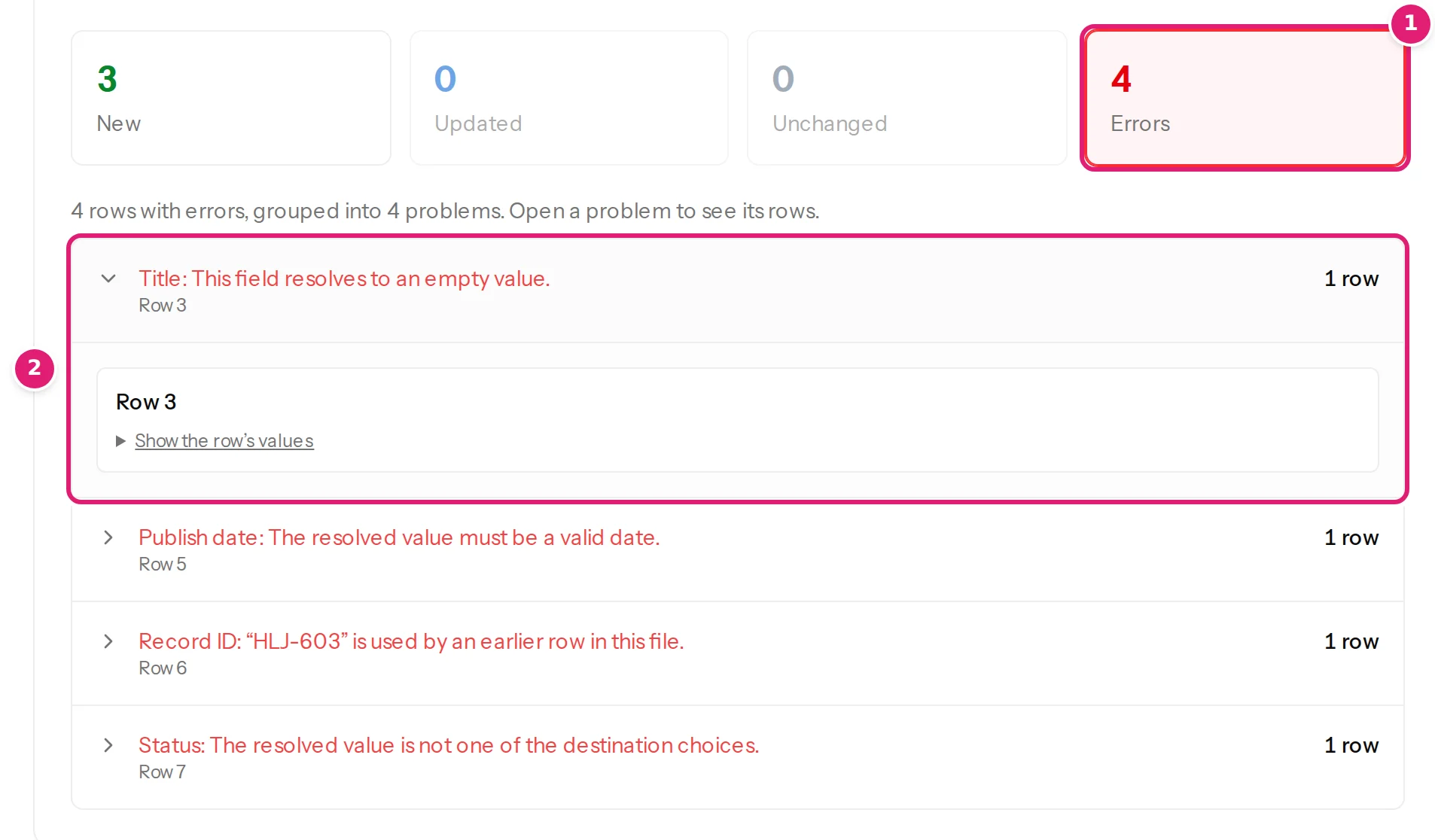
When a row has a problem
A custom field the site registers as a number must hold one, so lot 40’s estimate of TBC is listed under Errors with its row number, and the rest of the file goes ahead. Fix the cell and upload the file again: the corrected row is published and the others show as unchanged.
Said plainly
So that you do not find out after you start.
Content Uploader updates the items it published. A post written by hand, or published with another tool, is not matched by anything, so a row with the same title makes a new post beside it. Try the first import on a copy of your site.
A row you take out of the file does not take its post off your site. Posts, pages, files and categories are only created and updated.
A spreadsheet is never fetched from a web address or from the cloud, and nothing runs on a schedule. A person drops each file.
A configuration publishes to one site and one content type. The site needs HTTPS at a public address; WordPress multisite networks, sites on a private address and sites behind a password are not supported.
Matching looks at what was last published, not at the live item. When a row changes, every mapped field is sent, so an edit made on the site to one of them is replaced. Set a field to Keep existing on updates to let the site own it.
Custom fields are post meta: a plugin that keeps its data in its own tables cannot be filled. Menus, users and comments are not offered, and a post has one featured image and no gallery.
Can I update posts I created by hand? · Every known limitation
Try it
Small files from the Help Center’s tutorials, about a made-up sailing magazine. Use a test site: publishing creates real posts.
Eight sailing articles with an ID, a title, an HTML body, a category and tags. In the second file, two are new, three are edited and five are unchanged: the review of an update.
Twelve articles with a category path, a section and topic pair, and two tag columns with different separators.
Twelve articles with a slug, a summary, a category path, tags, an author, a publish date, a status, an image, its description and a custom field. Drop the workbook together with the ZIP of its twelve images.
Seven articles, four of them with a problem: an empty title, a repeated ID, a date that is not a date and an unknown status.
To see a whole file go through, follow Create one hundred WordPress posts from one spreadsheet, about 15 minutes.
FAQ
The questions that come up before the first file.
Not if each item keeps the same record ID in every file. A known ID is always an update, the same file twice finds everything unchanged, and a retry cannot make a second copy. Without an ID column, the title (or the slug) is what identifies a row, so a renamed title is a new item. The review shows every row as new, updated or unchanged before you publish.
Not directly. Content Uploader matches rows only against items it published itself, to the same site and content type. A post written by hand, or published with another tool, is not matched by ID, slug or title, so a row with the same title makes a new post beside it. To bring such content under its control, publish it from a spreadsheet first, tidy up the old copy by hand, and try the first import on a staging copy of your site.
Only if you choose. When the file has no Status column, new items are created as drafts for you to read on the site. Map a Status column, or set a fixed Published, when you want them live. WordPress schedules a published item that has a future date, and Published and Private are offered only when the connecting account may publish.
Posts, pages and the custom post types that WordPress’s REST API makes available and that the connecting account may edit, and, on a shop with WooCommerce 9.0 or later, products and their variations. The Sites page lists exactly what your site offers. A type that is missing is usually not exposed to the REST API, or the account may not edit it.
Yes: any custom field stored as post meta, by its name, from a column, a fixed value or a template. One the site registers as a number, a whole number or yes/no is checked against that type, and an empty cell removes the value. A plugin that keeps its data in its own tables cannot be filled, and one that needs more than the plain value, such as a hidden reference to the field’s definition, may not show a value written by name: try one item first.
WordPress 6.6 or later and PHP 8.1 or later, served over HTTPS at a public address, not a development machine or an intranet address. A WordPress administrator installs the plugin and starts the connection, and a workspace owner approves it. Multisite networks are not supported.
No. You install the plugin on your site and approve the connection there. Content Uploader is never signed in to your site: each request is checked against the permissions of the administrator who approved the connection, limited to content, and it can never delete anything. You can disconnect from either side at any time.
A shop is a WordPress site, so the same plugin connects it, and with WooCommerce 9.0 or later Products appears beside Posts and Pages, with its own checks for prices, stock and sales.
Create your workspace, connect your site and drop your spreadsheet. Nothing is written to your site until you have looked at the review.
Selling things? Update a WooCommerce shop. A page for every town or service? Location pages. Listings that keep changing? Listings and directories. Moving from another system? Migration from an export. Choosing between tools? Content Uploader and WP All Import. Not ready yet? Start with the quick start.