Categories with their parents
A path such as For sale > Villa becomes a category under its parent, and is created on the site when it does not exist yet.
CategoriesFor brokers, dealers and directories
Your villas, boats, vehicles, jobs or courses already live in a sheet that someone keeps right. Drop it on Content Uploader and every listing on your site is created or updated from it, after a review that shows each price and status that changes.
Casa Ligure Estates · latest sheet
Review firstvillas.xlsx
58 rows · 12 columns
villas.xlsx
58 rows checked against what you published last time
Villa Serenella, Portofino
Price €6,900,000 → €6,500,000
Palazzo Vista Lago, Lake Como
Availability Available → Under offer
Casa dei Limoni, Alassio
Tags Sea view, Terrace → Sea view, Terrace, Private jetty
Row 23 · Villa Rosa, Santa Margherita
Bedrooms: The resolved value must be a whole number.
Dropping the villas sheet.
An example: a fictional villa agency on the Italian Riviera, Casa Ligure Estates.
What it does for listings
Content Uploader is a web service that publishes the rows of a spreadsheet as listings on your WordPress or Joomla site: one row, one listing. You upload the sheet your team already keeps, the review shows what is new and what changes, field by field, and the site is updated when you approve it.
A column you choose is each listing’s ID, so the next sheet updates the listing you published before and does not make another.
Choosing the record IDThe review lists each price, status or tag that changes, with the old value next to the new one, before anything reaches your site.
How the review worksA status column can put a sold listing back to draft, so it leaves the site and is not deleted. It comes back when the sheet says it is available again.
Translate the values of a columnA column names the photograph: a file in a ZIP dropped next to the sheet, or a web address. A missing photograph never holds the listing back.
Map an image columnWhat changes
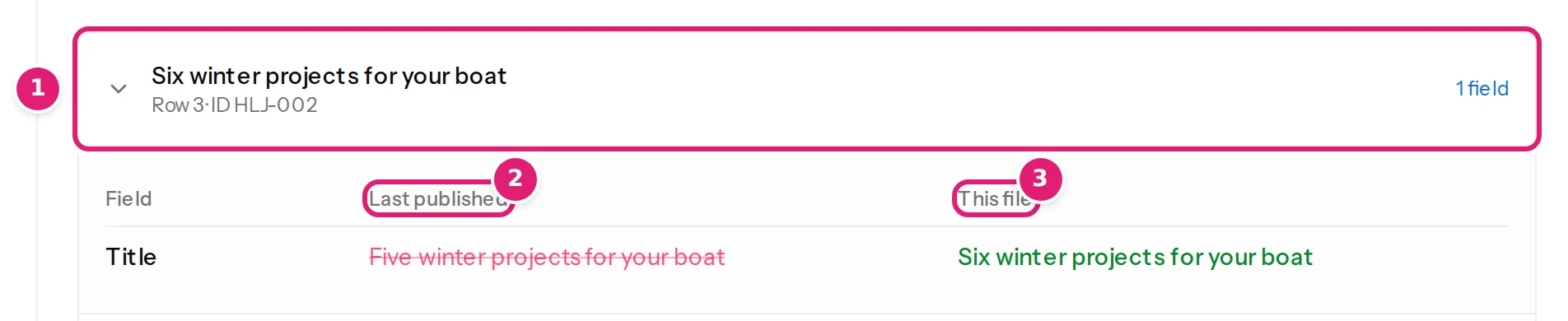
An updated listing shows only the fields that change, the value that was published before beside the value in this file. A price from €6,900,000 to €6,500,000, an availability from Available to Under offer and a tag that is added are each one line, and the listings that did not change are counted and left alone.
The picture is the Help Center’s, from an example journal about boats. How the review works
Built for listings
A sheet that holds a listing’s price, place, features and availability needs almost no translation.
A path such as For sale > Villa becomes a category under its parent, and is created on the site when it does not exist yet.
CategoriesA cell with Sea view, Terrace, Private jetty gives a listing three tags. Two columns of tags can be merged, and the missing ones are created.
TagsBedrooms, sea view and the price go into custom fields. A field the site registers as a number is checked as one, row by row.
Custom fieldsOne column can fill two fields: the availability shown on the listing, and, translated, whether the listing is published or a draft.
Status, dates and authorsThe ID stays with the listing, so a price changed in March and a photograph replaced in June both land on the listing that was published in January.
How rows are matchedA listing plugin’s post type is offered when the site makes it available, and its details are filled when the plugin keeps them as post meta.
Content types and fieldsTrades this fits
Villas are the example. A sheet with one row for each thing you list works the same way, with the columns that matter for it.
Price, bedrooms, location, availability
Price, length, year, berth or location
Price, year, mileage, availability
Location, salary range, closing date
Start date, price, places left
Category, address, opening hours
On WordPress a listing can be a post, a page or a post type that a listing plugin adds, when the site makes it available. On Joomla it is an article with custom fields. Plugins that keep their fields outside post meta cannot be filled. Custom fields
Said plainly
None of this is hidden in the small print.
A row that is missing from a sheet leaves its listing exactly as it is. Content Uploader never deletes anything, so a file can hold only the rows that changed.
Putting it back to draft takes it off the site and keeps it. If someone deletes it on the site, the next file that has its row creates it again under the same ID.
A “6+” in a bedrooms field that expects a whole number is listed with its row number and its reason, and the rest of the file goes on.
A listing that someone typed in by hand is not recognised: a row with the same title makes a second one. To bring your listings under it, publish them from the sheet, try the first file on a copy of your site, and tidy up the old entries by hand afterwards.
A person uploads each sheet. There is no link to a portal, no web address to poll, and nothing runs on a schedule.
A file may have up to 10,000 rows. A site with more listings is published from several files.
Can I update posts I created by hand? and every known limitation.
FAQ
Short answers about keeping listings right.
Whatever the sheet says. Translate the status column so that Sold means Draft, and the listing leaves the site at the next publish: it is a draft, not deleted. If the sheet later says Available again, the listing is published again. If you would rather keep a sold listing visible, leave it published and let the availability column say Sold.
Yes. A file may hold only the rows that changed, and a field set to “Keep existing on updates” is not sent for a listing that already exists, so a price update leaves its text, photographs and categories as they are. The title and the ID always come from a column, so a price file keeps its ID and name columns.
They can be named in it: a web address (https://…), or a file name that is found in a ZIP you drop next to the sheet. A listing whose photograph is missing is still published, and a missing photograph never removes the one the listing has.
Yes. Invite them to the workspace and give each person the sites they work on. A team member uploads to the configurations of their own sites, and the review is the same for everyone.
No. “Retry safely” sends the same operation again, and your site remembers the operations it completed, so a retry never makes a second copy. A retry sends exactly the content that was reviewed; to publish newer content, upload the file again.
Create a workspace, connect your site and drop your latest sheet. The review shows every price and status that would change before any of it does.
Listings on WordPress and Joomla. Building a page for every place you cover? Location and service pages.