Translate the values of a column
When a file says 1 where the site says Published, say what each value means. A field with a list of choices reads the values of its column through your table.
- 3 min read
- Updated October 14, 2026
A field such as Status has a fixed list of choices: Draft, Published, Private. A file written by another system may use its own words for them: 1, 0, -1, or live and offline. With Translate the values of the file you say which values of the column mean which choice, and every row is read through that table.
Set it up#
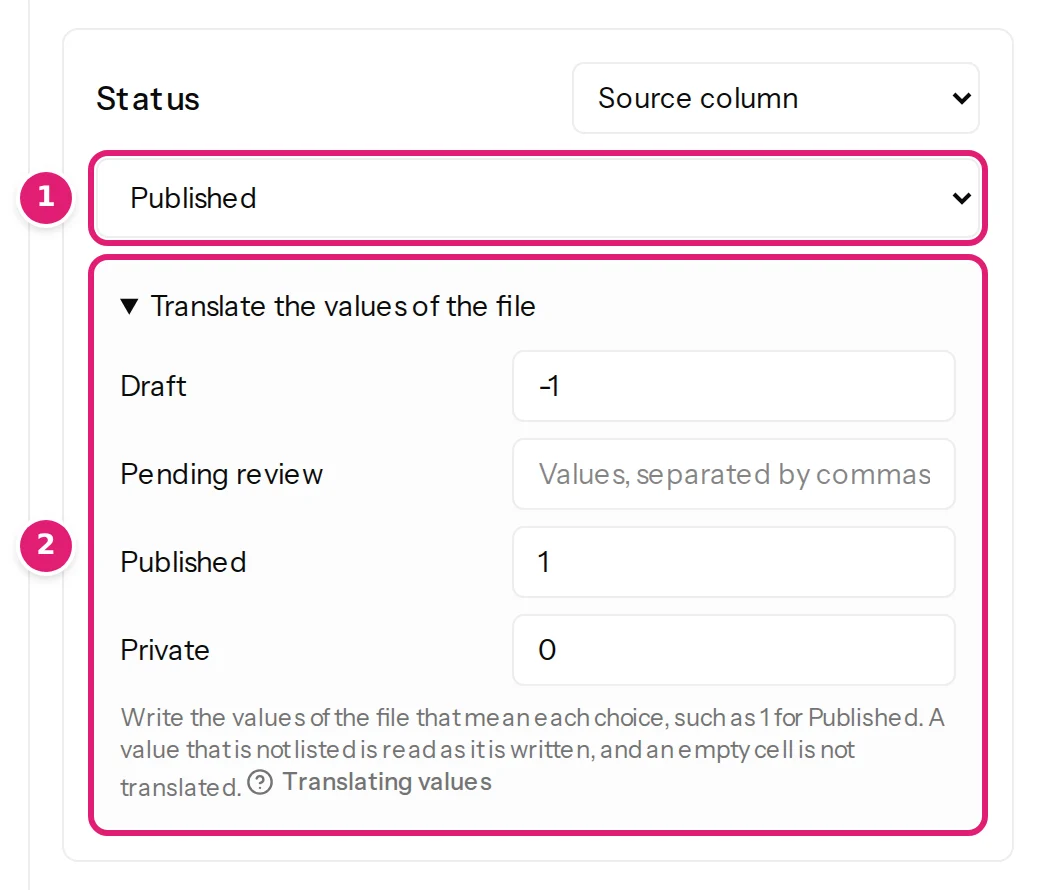
Choose Source column for the field and the column. Under the column, open Translate the values of the file. It lists each choice of the field, with a box beside it:
| Choice | The values of the file that mean it |
|---|---|
| Draft | -1 |
| Published | 1 |
| Private | 0 |
Write the values separated by commas. Leave a choice empty when no value of the file means it.
What a row does#
- A value in the table becomes its choice. Capitals do not matter and spaces around a value are ignored.
- A value that is not in the table is read as it is written. A cell that says draft still means the choice Draft, and a cell that means nothing at all is an error as before: The resolved value is not one of the destination choices.
- A cell with several values is read value by value, separated at commas. A WooCommerce export writes
simple, downloadable, virtualfor a product that is all three: with simple in the table of the product type, the row is a simple product. If more than one choice of the table has one of the values, the first in the list of choices wins. - An empty cell is not translated. What an empty cell does is what it did without a table (empty cells).
- The preview and the review show the choice, such as Published, not the value in the file, so you see what the site will hold.
Where it can be used#
- A field with a list of choices that is set from a column. A fixed value is the site's own word and is not translated.
- A field with a list of numbers and names, such as an author, is not translated: it already finds a person by name, email address or ID.
- A field that holds several choices reads its cell value by value and does not need a table.
When something is wrong#
| What you see | What it means and what to do |
|---|---|
| The resolved value is not one of the destination choices. | The cell has a value the table does not know. Add it to the choice it means, or correct the file. |
| The site doesn’t offer the choice “live”. | The table lists a choice the site no longer has. Refresh the site's fields on the Sites page and set the field again. |
| Use at most 50 values of at most 255 characters for each choice. | Shorten the list of values of one choice. |
Was this article helpful?
Related articles
- Mapping columnsValue modes: column, fixed value, template, default, keep, removeThe six ways a field gets its value, and what each does when an item is created and when it is updated: column, fixed value, template, default, keep existing, remove.
- Mapping columnsHow mapping worksMapping connects your spreadsheet's columns to the destination's fields, once: the editor's sections, four ways to fill a field, automatic matches and the preview.
- Mapping columnsStatus, dates and authorsPublish items as drafts, published or archived, per row or for all; set publish dates; choose authors by name, ID or email. The choices each platform offers and the errors.
- Mapping columnsRead only some of the rows of a fileA file can hold items of several kinds. Choose the rows a configuration reads, such as the rows where Type is variation, and see how many the review left out.