What is Content Uploader?
Content Uploader publishes the rows of a spreadsheet as WordPress or Joomla content, and shows you every change before anything goes live.
- 3 min read
- Updated October 14, 2026
Content Uploader is a web service that turns a spreadsheet into content on your website. You upload a CSV or Excel file, tell Content Uploader which column holds the title, which holds the text, the categories and so on, and it creates or updates the matching posts, pages or articles on your WordPress or Joomla site, or the products of your WooCommerce shop.
What makes it different from a simple import tool is that it is controlled. Before a single item is created or changed, Content Uploader compares your file with what it published last time and shows you the result: which items are new, which will change (field by field), which are unchanged and which rows have problems. Nothing is written to your site until you approve it.
The short version#
- Connect your site once. You install a small connector (a plugin for WordPress, an extension for Joomla) and approve the connection. You never give Content Uploader your CMS password.
- Set up a configuration once. You upload a sample file and map its columns to the fields of your content type. You also choose which column identifies each row, so that later files update the same items instead of creating duplicates.
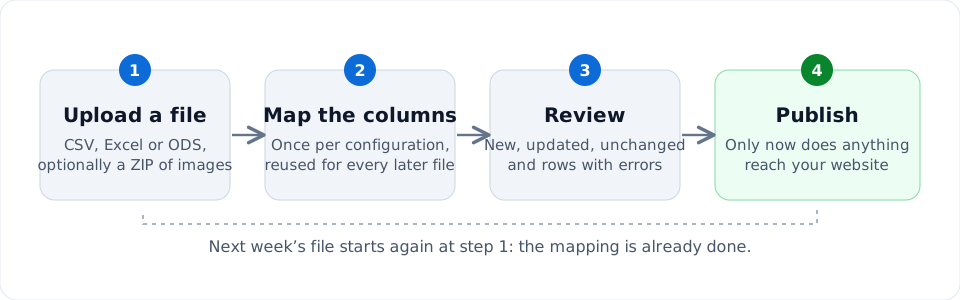
- Upload each new file. Content Uploader reads it, checks every row and compares it with your site.
- Review, then publish. You read what will change and press Publish. Only then does anything reach your site.
The same configuration serves every later file, so next week's update is one file drop and one review.
What it does not do#
- It never deletes content. Removing a row from your file does not remove the item from your site, and deleting a configuration does not remove what it published.
- It does not fetch files for you. You upload each file yourself. A Google Sheet has to be downloaded as CSV, Excel or OpenDocument first.
- It does not guess. A row with a problem is reported with its row number and field, and is skipped. The rest of the file is not held back.
- It is not a design tool. It publishes what is in your cells, as text or HTML. How your theme displays it is up to your theme.
What you can publish#
Every writable field your site offers can be filled from your spreadsheet: titles, body text and HTML, excerpts, slugs, status, authors, publication dates, categories (including parent categories), tags, custom fields and images. Each field can take a column, one fixed value for every row, or a template that combines several columns. Mapping columns explains every option.
What you need#
- A Content Uploader account. The Free plan has no time limit and needs no payment card; plans and allowances explains the limits.
- A WordPress or Joomla site served over HTTPS, and permission to install the connector on it. Supported platforms lists the versions.
- A spreadsheet. If you do not have one yet, download an example.
Ready to try it? Follow the quick start: you will publish eight example articles in about fifteen minutes.
Was this article helpful?
Related articles
- Getting startedHow the import and publishing workflow worksUploading, mapping, reviewing and publishing are four separate steps. This page explains each one and exactly when your site is changed.
- Getting startedWho is Content Uploader for?Content Uploader suits teams and agencies that keep website content in spreadsheets and need to publish it, and update it, again and again.
- Getting startedSupported CMS platformsContent Uploader publishes to WordPress 6.6 and later and to Joomla 5 and 6. This page lists the requirements and what is not supported.
- Getting startedImportant concepts and terminologyThe words this documentation and the app use, in the order you meet them: workspace, site, connector, configuration, record ID, run and more.