Updating content that is already published
What happens to an item you published earlier when its row changes: the review lists the changed fields, every mapped field is sent, and the address and ID stay.
- 5 min read
- Updated October 13, 2026
Because every item is recognised by its record ID, the same spreadsheet can be uploaded again and again. Rows that match an item published earlier are compared with it, and only the items that are different are touched.
What the comparison looks at#
For each row that matches a published item, Content Uploader compares three things:
- what this file would publish;
- what was last published for that item (its fields, terms, image and custom fields);
- the item's current state on the site (does it still exist, is it in the trash, is someone editing it, can the account still edit it).
The result is one of:
| Result | Meaning |
|---|---|
| Unchanged | The file's values equal what was last published and the item is as published. Nothing is sent, and it does not use your allowance. |
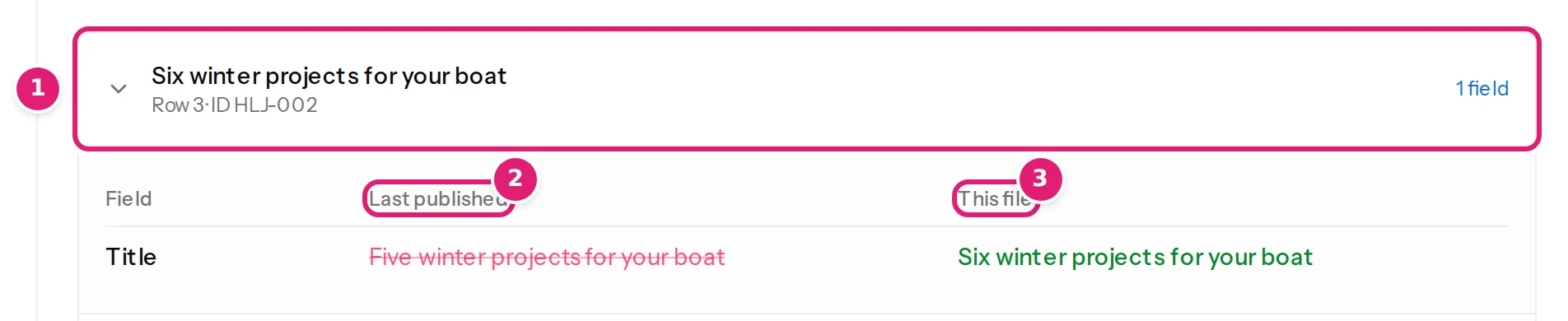
| Updated | At least one field, term, image or custom field differs. The review lists the fields that change, with the last published value struck through and the new one next to it. Only the item is sent, and it is changed in place: same post or article, same address, same ID. |
| New | The ID has not been published before. |
| Skipped | The item cannot be written now (see below). It is left as it is. |
An item that is missing from the new file is not touched. Content Uploader never deletes anything.
Only mapped fields are sent#
An update sends the fields your mapping covers. A field you left on Use destination default or Keep existing on updates is not sent, so whatever is on the site stays: a status an editor changed, an excerpt someone polished (value modes). A field you mapped is sent, so the file wins.
When the site was changed by hand#
Content Uploader compares your file with what it last published, not with a fresh copy of the item. That has three consequences:
- An edit made on the site to a title, an excerpt, tags and the like is not noticed while the file's row stays the same: the item is listed as unchanged and the edit stays on the site.
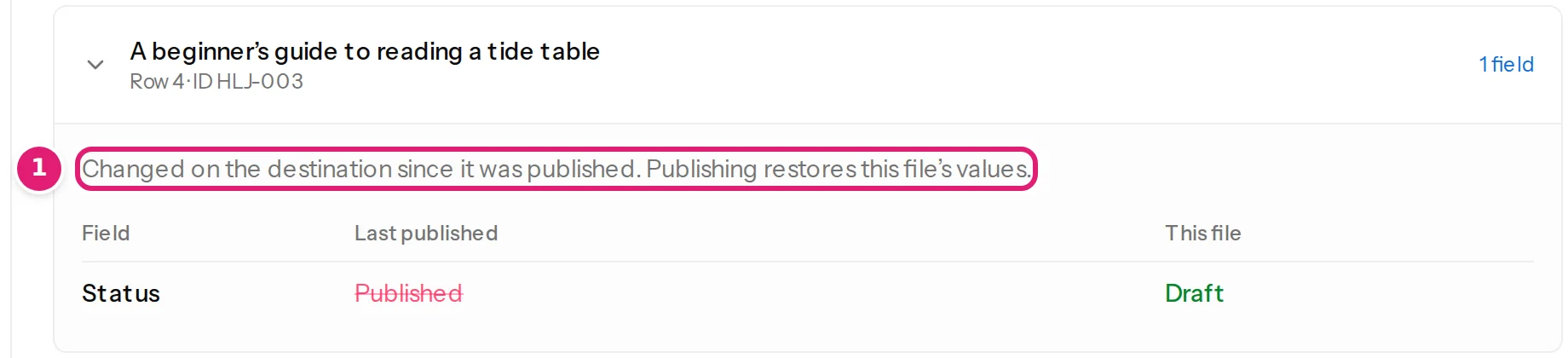
- The exception is the status. When the status on the site differs from what the file says (someone published a draft by hand), the item is listed as updated, with the reason Changed on the destination since it was published. Publishing restores this file's values.
- When the row does change, the item is updated and every field you mapped is sent: the file's value for each one replaces what the site has at that moment, including edits made on the site since the last upload.
You decide, field by field, who owns it after the first publish:
- the file owns it: map it from a column, a fixed value or a template;
- the site owns it: choose Keep existing on updates (or Use destination default), check the file again, and the site's value stays.
Items that cannot be updated now#
| The review says | What it means and what to do |
|---|---|
| The destination item was deleted, so it is created again. | Someone deleted the item on the site. It is created again under the same ID. |
| The last attempt to publish this item failed. It is sent again. | A previous attempt failed; this time it is retried. |
| In the destination's trash. Restore it or delete it permanently, then check the file again. | Skipped. A trashed item is not touched. |
| Being edited on the destination, so it is left as it is. A later upload updates it once it is closed there. | Skipped. Joomla: an editor has the article checked out. |
| Still being published by another upload. | Skipped. Finish the other file first. |
| The connected account cannot edit this destination item. | Skipped. The publishing account lost the right to edit it. |
| Another destination item already uses this record ID. | Skipped. Two site items claim the same ID, which Content Uploader cannot resolve. |
| Uses categories or tags that don't exist on the site yet, and the configuration doesn't add new ones. | Skipped; add the terms or turn on adding them (new categories and tags). |
Skipped items are listed under Skipped with their reason, and the next upload tries them again.
Partial files#
A file does not have to contain every item. A short file with only the rows that changed updates exactly those. A file with a few rows plus all their IDs is a good way to correct a handful of items. The rows that are missing are simply not looked at.
A changed ID, title or slug#
- A different record ID is a different item: it is created new, and the old one stays on the site.
- Without a record ID column, a changed title (or slug) is a new item for the same reason (choosing the record ID).
- A changed slug on an existing item changes its web address (title and slug).
See it in practice#
The update existing content tutorial walks through a second week with new, changed and unchanged rows.
Was this article helpful?
Related articles
- TutorialsUpdate existing content from next week's spreadsheetUpload a second version of the same spreadsheet and watch Content Uploader publish only what changed: two new articles, three updated, five left alone, with no duplicates.
- Mapping columnsValue modes: column, fixed value, template, default, keep, removeThe six ways a field gets its value, and what each does when an item is created and when it is updated: column, fixed value, template, default, keep existing, remove.
- Reviewing and publishingSkipped items and why they are skippedItems that cannot be published right now are listed under Skipped with the reason: in the trash, being edited, no permission, missing categories or another upload.
- Reviewing and publishingHow rows are matched to items on your siteHow Content Uploader decides that a row is new or the same item as before: by record ID, or by slug or title with the category as tiebreaker.