Content, excerpt and HTML bodies
Map the body of your items from a column that holds HTML, or build it from several columns with the rich editor. Intro and full text on Joomla, excerpts on WordPress.
- 3 min read
- Updated October 13, 2026
The body of an item is its largest field and the one most often built from more than one column. Content Uploader gives you two ways to fill it.
The field is called…#
| Platform | Fields |
|---|---|
| WordPress | Content (the post's text) and Excerpt (its summary). Excerpt is offered for pages and for post types that support excerpts. |
| Joomla | Intro Text (the text, or the part before Read more) and Full Text (the part after it). Both are optional; a title and a category are the only required fields. |
1. A column that holds the finished text#
Choose Source column and pick the column: the body column of your spreadsheet. Whatever is in the cell is sent: plain text, or HTML such as <p>First paragraph.</p><p>Second.</p>. This is the way to go when the text, with its formatting, already exists in the spreadsheet (HTML in cells).
A column that holds HTML should be mapped this way. Do not insert it with a placeholder in an HTML template: placeholders insert text, with the tags escaped.
2. A template built from several columns#
Choose Template and the editor changes into a rich text editor on a white page, with a toolbar and a list of your columns above it:
- Write the text and the formatting you want around the values: a heading, two paragraphs, a list, a link.
- Put values where they belong: select a column under Source columns to insert its placeholder at the cursor, or drag it into the text.
- Use HTML source for exact control of the markup, and Visual editor to go back.
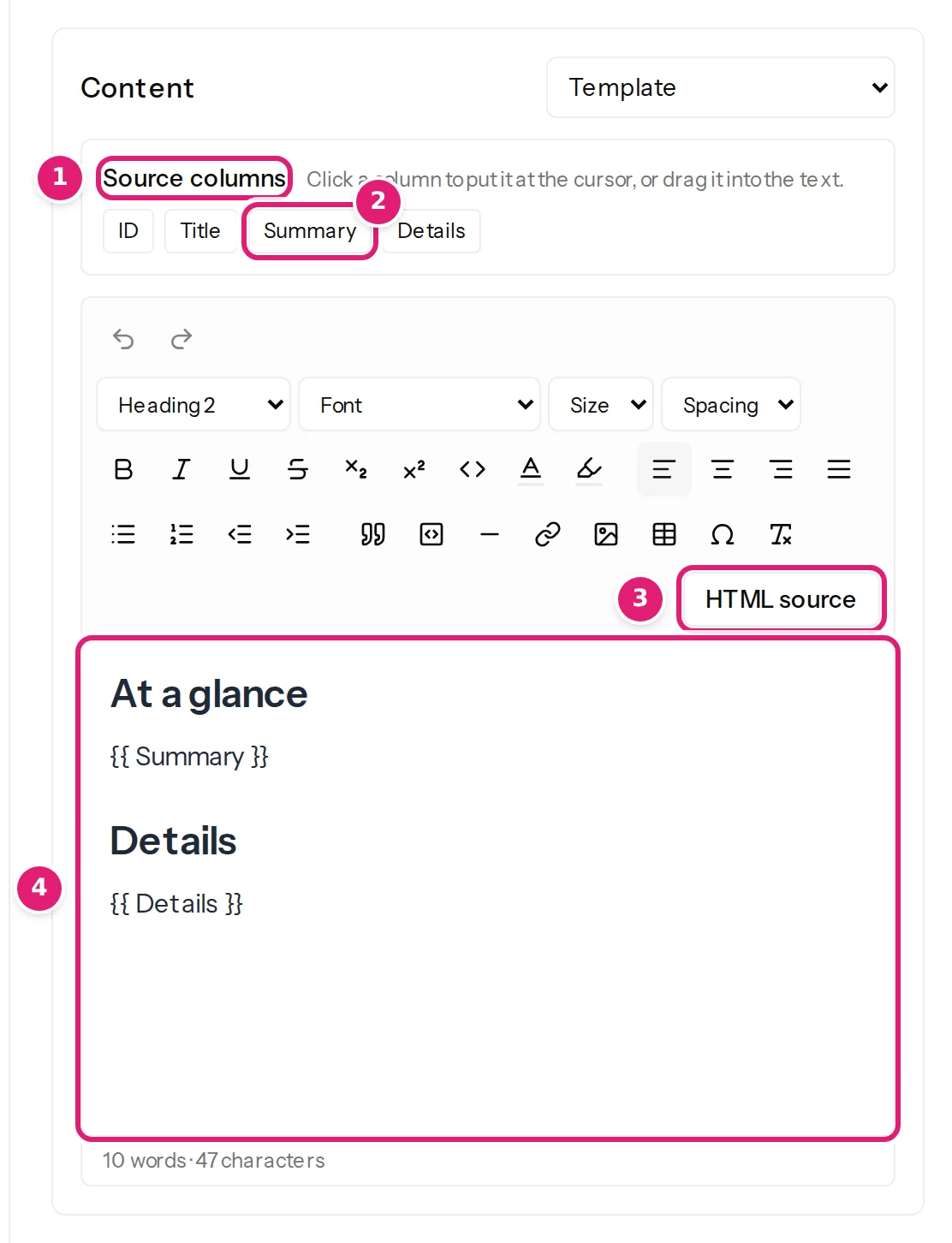
For example, a template with a heading About this boat, then {{ Summary }}, a heading Details, and {{ Details }} makes the same layout for every row from the cells Summary and Details.
Remember the rule for HTML templates: placeholders insert plain text (tags in a cell are escaped and would show as text). That is exactly right for names, numbers, prices and short texts, which is what templates are for. Templates and placeholders explains it.
Excerpt and summaries#
Map a Summary column to Excerpt the same way. If the destination should make its own excerpt, leave it on Use destination default or Keep existing on updates. An empty cell in a mapped excerpt empties the excerpt (empty cells).
Intro and full text on Joomla#
Joomla stores an article's text in two parts joined by a Read more marker. Map your text to Intro Text only and the article has a single text; map a second column to Full Text and the article gets a Read more link in the blog and list layouts. A Read more marker inside either value is refused (Intro and full text cannot contain a Read More marker.) because Joomla would split the text there.
What the site does with the HTML#
The site filters it as it does for an editor's input: tags it does not allow are removed. WordPress uses its post-content filter; Joomla uses the text filter of the publishing account's group. See HTML in cells.
Preview it#
The Preview panel shows the body rendered, in a frame of its own, for the record you pick; Open in window shows it larger. In the review, opening an item shows the same (preview).
Limits#
The cell limit applies to each cell (32 KB); a template's result may be longer, up to the field's own limit (about a million characters). A body longer than a cell can be assembled from two columns with a template.
Was this article helpful?
Related articles
- Preparing your spreadsheetHTML and formatted text in cellsPut paragraphs, headings, links and lists into a body cell: what WordPress and Joomla filter out, why images inside the text stay links, and the cell size limit.
- Mapping columnsTemplates and {{ placeholders }}Combine fixed text with column values in titles, slugs, texts and bodies: the {{ placeholder }} syntax, the rich HTML template editor, escaping and what a placeholder inserts.
- JoomlaJoomla article fields you can mapEvery field Content Uploader can write on a Joomla article: text, status, dates, access, language, metadata, article options, links, category, tags, images, custom fields.
- WordPressWordPress content types and fields you can mapWhich WordPress content types Content Uploader can write (posts, pages, products and custom post types), and every field, taxonomy, custom field and featured image it offers.