Plans, allowances and what happens at a limit
What each plan includes, what counts as a record write and as image transfer, when allowances renew, and what the review offers when a file needs more than what is left.
- 6 min read
- Updated October 14, 2026
Every plan has the whole importer: every writable field, categories and tags, templates, images, custom fields, creating and updating, change detection, validation, preview, approval, saved configurations and history. Plans differ only in capacity: how many sites, how many items you can write a month, how many images you can send, how many people can share the workspace, and whether you can ask for support by email.
The plans#
| Free | Small | Medium | Large | |
|---|---|---|---|---|
| Monthly price | €0 | €15 | €29 | €69 |
| Annual price (ten months, paid upfront) | none | €150 | €290 | €690 |
| Connected sites | 1 | 1 | 5 | 20 |
| People in the workspace | 1 | 3 | 10 | 30 |
| Record writes a month, shared by all sites | 100 | 10,000 | 25,000 | 100,000 |
| Image transfer a month | 500 MB | 20 GB | 50 GB | 200 GB |
| Support | Documentation and public forums |
Prices are in euros and, for businesses, shown without VAT; billing and invoices explains VAT. The file limits (file size, rows, columns, ZIP size) are the same on every plan: see limits. The pricing page at /pricing shows the same numbers.
The Free plan needs no card and has no time limit. You can check and review real files as often as you like and publish a sample within the allowance. The one thing that ends it is nobody using it: a Free workspace with no sign-in or upload for 12 months is deleted, after two emails that let you keep it with one click (is a Free workspace deleted if I do not use it?).
What counts as a record write#
A record write is one item successfully created or updated on a site.
- An item's fields, categories, tags and images do not count separately; the same content published to three sites is three record writes.
- Not counted: uploading, checking, validating, previewing, reviewing, rows with errors, skipped and unchanged items, failed attempts, automatic retries and a retry of an operation that was already counted.
- An item published without an image (a warning) does count, because it was written. An item recreated after someone deleted it on the site counts as a create.
So an unchanged weekly file costs nothing: the review shows only what is new or different, and only those items are written. The Publish N changes button states exactly what the run will use.
What counts as image transfer#
Image transfer is the size of the images attached to the records a run writes. Each distinct image counts once per site in a run, with the first record that uses it: forty rows sharing one image count its size once. An image whose size is not known counts nothing, and so does an image that could not be used. Only written records count: unchanged, skipped and invalid rows carry no images into the count, and a failed item gives its images back.
When the allowances renew#
Allowances renew once a month, counted from your own start date, not on the first of the calendar month. For a paid workspace that is the day the subscription started: a subscription bought on the 20th gets a fresh allowance on the 20th of each month. An annual plan works the same way: it is paid once a year, but its allowances renew every month. On the Free plan the cycle starts on the day the workspace was created. Unused allowance does not carry over.
The Billing page shows the cycle, the usage so far and when it resets (the date is shown in Malta time):
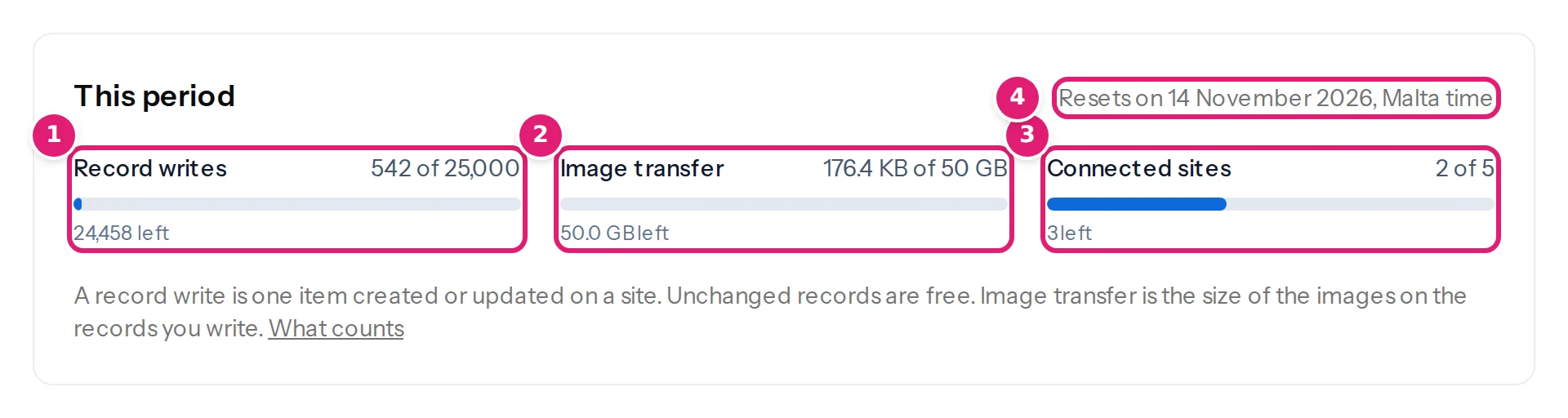
A run counts against the cycle in which it was approved, even if it finishes after the cycle ends. When you upgrade, what you used so far this cycle counts against the new allowance: 9,000 writes used on the Small plan leave 16,000 of the Medium plan's 25,000.
What happens when a file needs more than what is left#
Uploading, checking, validating and reviewing never use the allowance, so you always see the whole picture. At the review, Publish N changes shows what is left: 24,992 record writes left on the Medium plan until 12 November. If the run needs more than what is left, the page does not publish anything yet. It says Not enough of your allowance left, says what is short, and offers:
- Publish the first N changes: publishes the longest run of changes, in file order, that fits every allowance. The rest stays unpublished.
- Upgrade your plan.
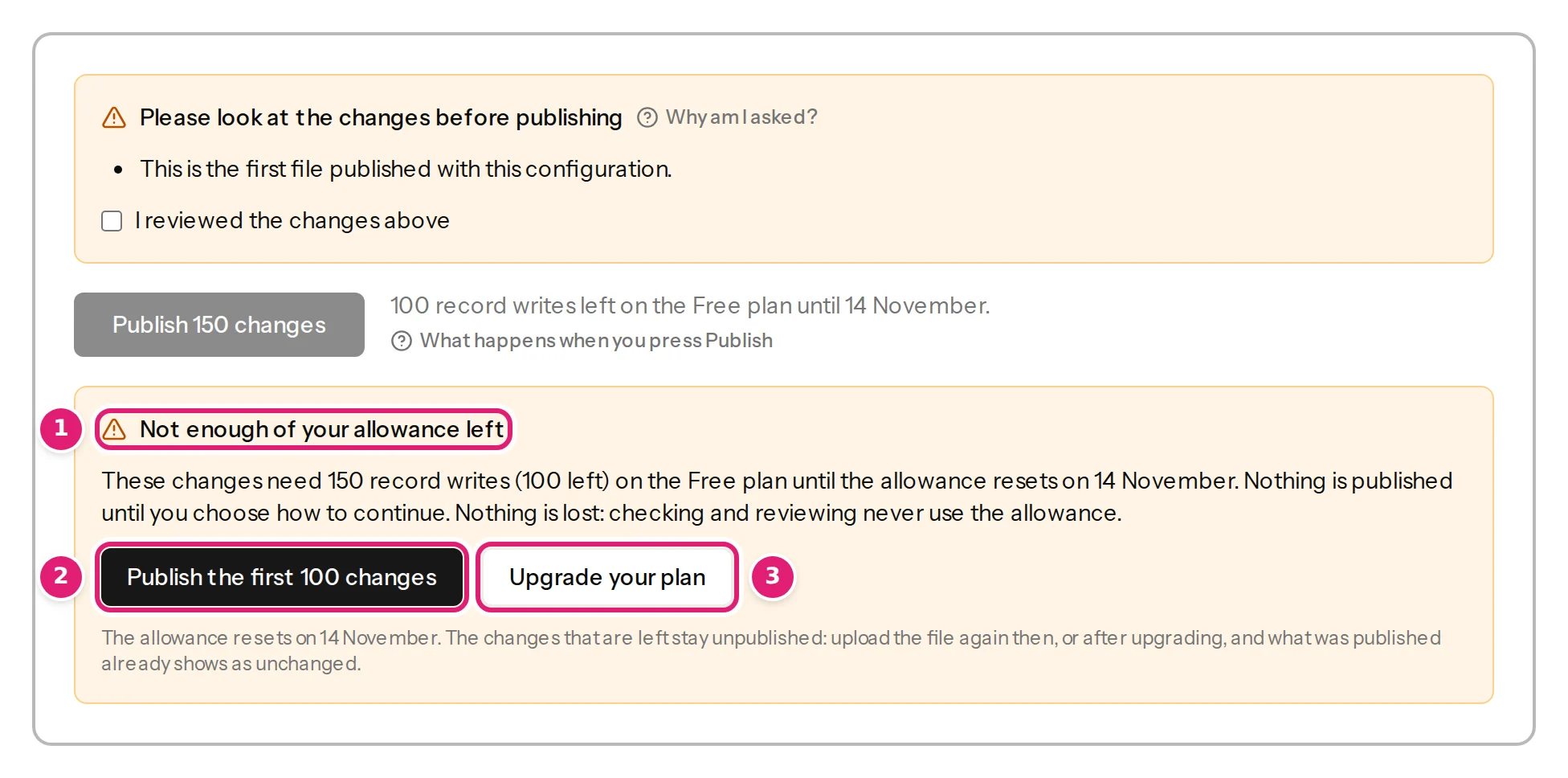
The page adds The allowance resets on …. The changes that are left stay unpublished: upload the file again then, or after upgrading, and what was published already shows as unchanged. That is exactly how to finish: after the reset or the upgrade, upload the same file again. The items that were published are shown as unchanged and cost nothing; the rest are new.
A run that does not fit waits for your review even if the configuration is set to publish automatically. A run that has started is never stopped halfway.
Sites and people#
The number of connected sites a plan allows applies when you connect a new site and when you publish. It never stops you renewing access to a site, reconnecting one or keeping one connected. A workspace over its limit, after a downgrade for example, keeps its extra sites connected, but they are paused until you choose which stay active: see managing your connected sites. A staging copy of a site counts as a site, and its writes count too.
People in the workspace counts the owner, the team members and the invitations still open: see team members.
Changing plan#
- Upgrading takes effect at once; you pay the difference for the rest of the period.
- Downgrading or cancelling takes effect at the end of the period you paid for.
- When a subscription ends, or a renewal fails for good after Stripe's retries, the workspace returns to the Free plan. Nothing is deleted: configurations, uploads, history and sites stay, and published content stays on your websites. Sites beyond the Free plan's limit are paused.
How to change plan and where the invoices are: billing and invoices.
Plan cards#
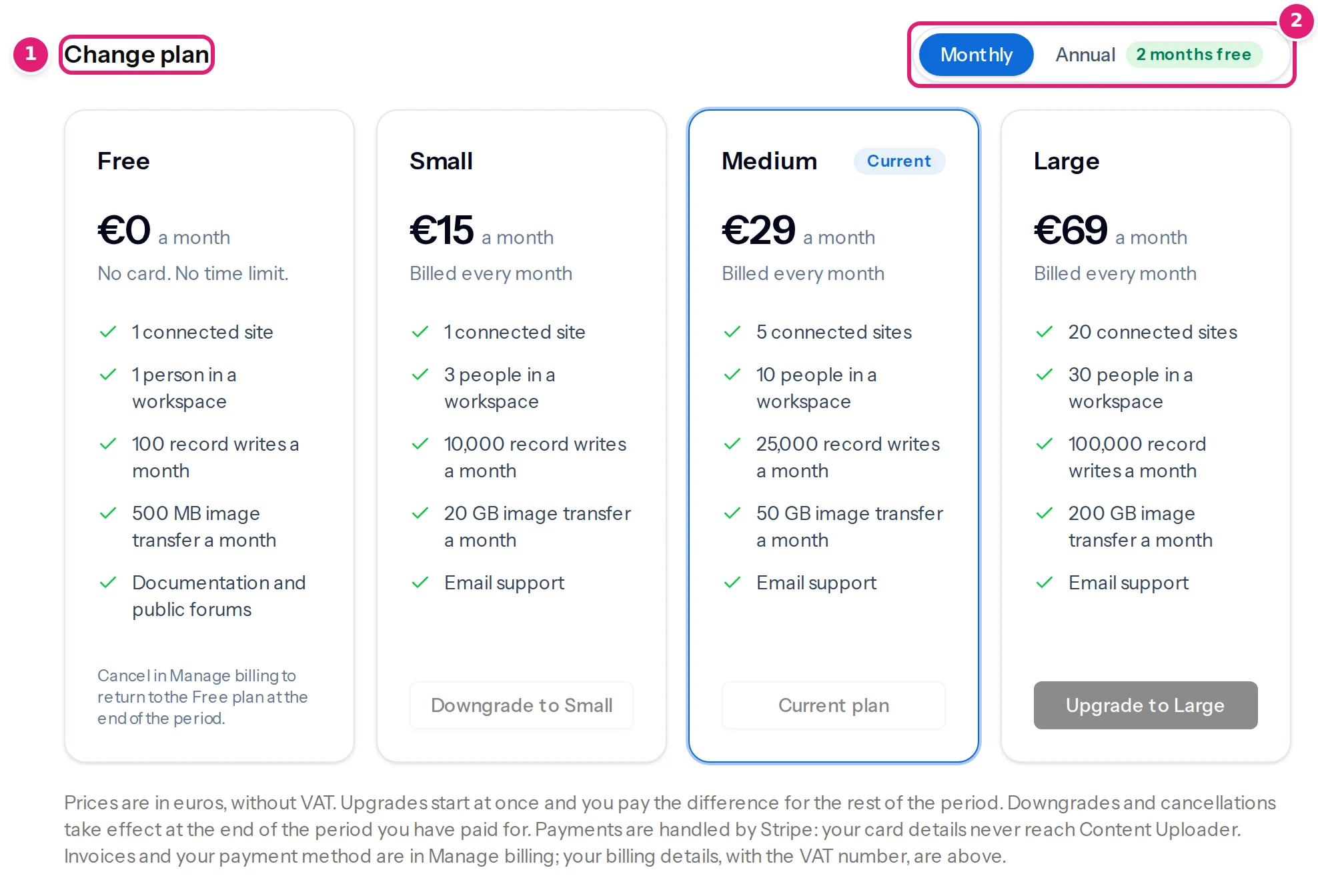
The Billing page's Change plan section shows the four plans with a monthly and an annual toggle (2 months free yearly), what each includes and the button that fits: Upgrade to …, Downgrade to …, Current plan.
Was this article helpful?
Related articles
- Account and workspaceBilling, VAT, invoices and withdrawing from a subscriptionAdd billing details, subscribe or change plan, how VAT and the reverse charge work, where invoices are, failed payments, and a consumer's 14-day withdrawal.
- Account and workspaceManaging your connected sitesThe Sites page explained: status, when access ends, renewing, refreshing fields, disconnecting, sites paused by your plan, and publishing results with their attempt history.
- Reviewing and publishingPublish your changes: exactly when and how your site is changedWhat happens when you press Publish: the checks made at that moment, the background publishing, the progress and the result, and what can and cannot be undone.
- FAQWhat counts as a record write?A record write is one item successfully created or updated on a site. What is free: checking, previews, unchanged and skipped items, errors, failed attempts and retries.