Workspaces, owners and the workspace switcher
What a workspace is, what belongs to it, how to move between several workspaces, and what the notices about a paused, suspended, locked or deleted workspace mean.
- 4 min read
- Updated October 14, 2026
A workspace is the container for everything you do in Content Uploader: the websites you have connected, the configurations you built, every upload and its history, the team, and the plan with its allowances. Your plan, your limits and your usage belong to the workspace, not to you as a person.
Your first workspace#
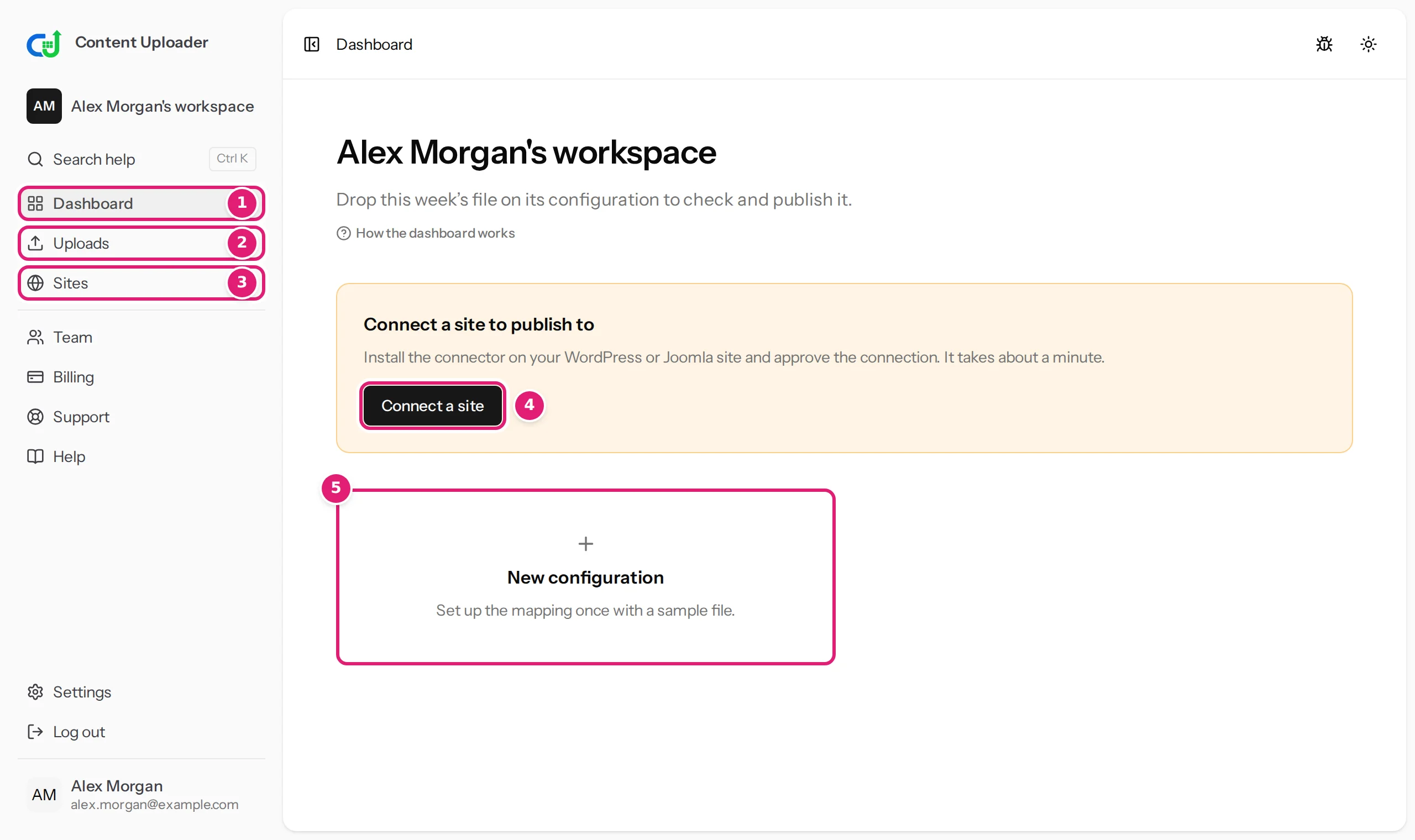
When you create an account, Content Uploader creates a workspace for you and makes you its owner. Its name is your name followed by workspace, for example Alex Morgan's workspace. The name is shown at the top of the sidebar.
What belongs to a workspace#
| Part of the workspace | Where it is | Who reaches it |
|---|---|---|
| Connected sites | Sites | Owners: all. Team members: the ones they were given |
| Configurations and their versions | Dashboard | Everyone, for the sites they reach |
| Uploads, review results and publishing results | Uploads, Sites | Everyone, for the sites they reach |
| People and invitations | Team | Owners (team members see only their own part) |
| Plan, usage, billing details and invoices | Billing | Owners |
| Support requests | Support | Everyone |
Content that was already published to your websites does not belong to the workspace: it lives on your sites and stays there whatever happens to the workspace.
Owner and team member#
A workspace has an owner (the account that created it) and as many team members as the plan allows. An owner can do everything in the workspace; a team member can work with the sites they were given. Inviting team members has the complete list of what each role can do.
Working in more than one workspace#
You belong to more than one workspace when someone invites you to theirs. An agency member, for example, has their own workspace and the client's workspace they were invited to. When you belong to more than one, the top of the sidebar becomes a switcher: it shows the current workspace and your role in it (Owner or Team member), and selecting it lists all your workspaces. Choose one to open it.
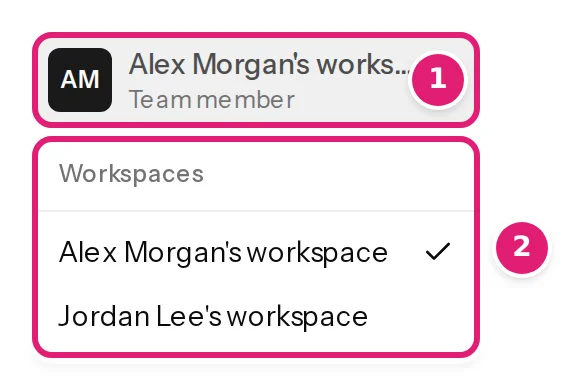
Each workspace has its own plan, its own sites and its own history. Opening another one never changes the first.
Notices about the state of a workspace#
Normally you never see these. If an operator has to stop something, the app tells you at the top of the pages of the workspace:
- Publishing is paused. Nothing is sent to any site until we lift the pause. You can still upload and check files, and everything that waits is published afterwards.
- This workspace is suspended. Nothing is uploaded, checked or published until it is released. You can still sign in, read your history and look after your site connections. A workspace is suspended, for example, while a consumer's withdrawal from the contract is being completed (see billing and invoices) or for a reason the Terms of Service describe under Suspension and termination. The notice may include a reference to quote when you write to support.
- Locked. A locked workspace cannot be opened at all. The page says … is locked. It cannot be opened until it is released. Nothing in it is deleted. with a reference and the support address, and lists your other workspaces, which are not affected.
In all three cases nothing is deleted. Write to support and quote the reference.
A fourth page looks like a lock but has another cause: it says, for example, Alex Morgan's workspace is deleted. The workspace was deleted because its last member left or because nobody used a Free workspace for 12 months. Nothing is erased for 30 days, and an owner of an unused Free workspace can restore it from that page (a deleted workspace).
Renaming or moving a workspace#
The workspace name is set when the workspace is created; there is no setting for changing it, and a workspace cannot be handed to another owner. If you need either, write to support and say what you need.
Deleting a workspace#
There is no button for it. A workspace is deleted when its last member leaves or deletes their account (delete your account), and a Free workspace nobody uses is deleted after 12 months and two emails (a deleted workspace). Otherwise write to support. Data and retention explains what is kept, for how long, and how to ask for your data to be exported.
Was this article helpful?
Related articles
- Account and workspaceA deleted workspace: what you see and how to get it backWhen a workspace is deleted, the two emails a Free workspace gets first, the page its members see, how an owner restores it, and what is erased after the waiting period.
- Account and workspaceInviting team members and choosing their sitesInvite colleagues by email, give each person only the connected sites they should use, change or take that access away, and see what a team member can and cannot do.
- Account and workspaceManaging your connected sitesThe Sites page explained: status, when access ends, renewing, refreshing fields, disconnecting, sites paused by your plan, and publishing results with their attempt history.
- Account and workspacePlans, allowances and what happens at a limitWhat each plan includes, what counts as a record write and as image transfer, when allowances renew, and what the review offers when a file needs more than what is left.