When Publish is refused: every message and what to do
The messages shown when Publish does nothing: out-of-date review, changed destination, reconnect, paused site, too small an allowance, paused workspace.
- 5 min read
- Updated October 13, 2026
Pressing Publish is checked once more at that moment (what happens when you press it). If something is no longer as it was when you reviewed the file, nothing is queued and nothing is changed on your site; a message appears under the button, usually with a Check this file again button. A check never costs allowance, so it is always safe to press.
The messages#
| Message | What happened | What to do |
|---|---|---|
| This file was checked again after you opened it. Review the new results before publishing. | The file was checked again (by you in another tab, or by someone else) after you opened this page. You may only approve what you have seen. | Select Show the new results, read them and publish. |
| This file was already published or is being checked again. | Someone already pressed Publish, or a re-check is running. | Reload the page. If it shows Ready for review, publish; if it shows Checking, wait. |
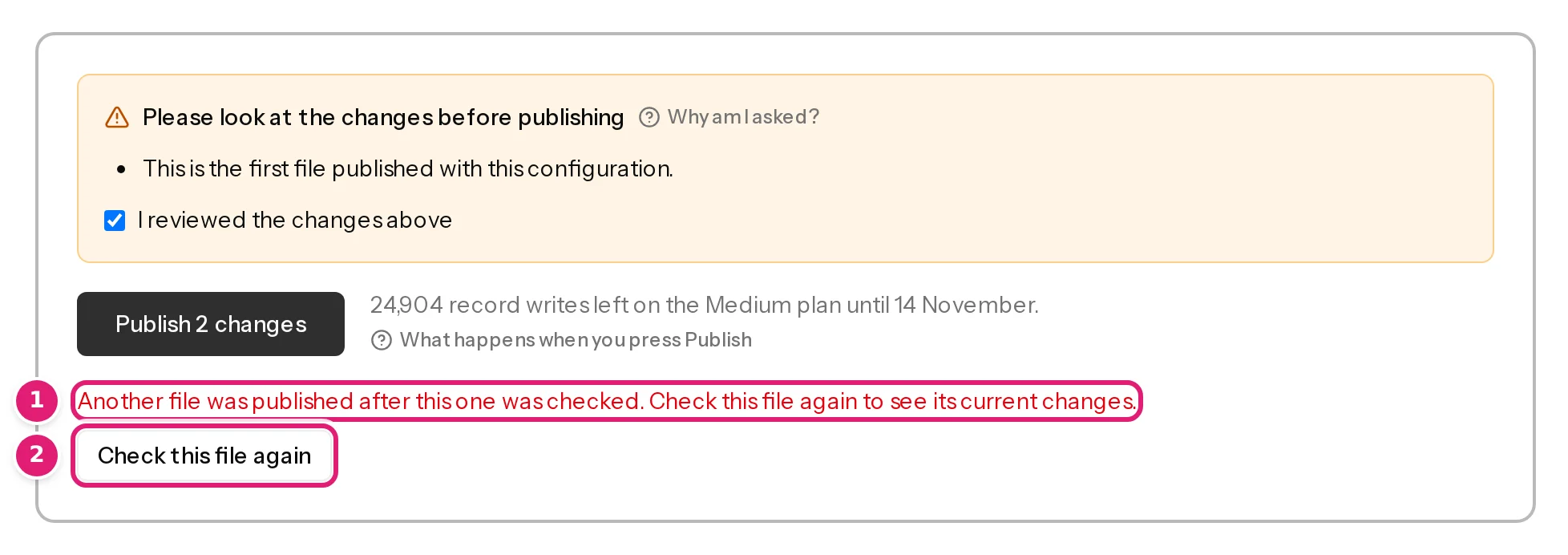
| Another file was published after this one was checked. Check this file again to see its current changes. | Another file published one of the same items while this one waited for review. Publishing this review as it is would write over that or create a copy. | Select Check this file again. The items now show as updated or unchanged (preventing duplicates). |
| The destination’s fields changed after this file was checked. Check the file again to continue. | The site's fields (new custom fields, a changed status list, another plugin) differ from when the file was checked. | Check this file again. If the configuration needs a decision about a new field, the review says so (attention reasons). |
| Reconnect the destination site with its connector plugin, then publish again. | The site is disconnected, its access has ended, or its connector no longer answers as the current version. | Reconnect or renew the site (WordPress, Joomla), then publish the same review. |
| This site is paused because your plan allows 1 active site. Choose which sites stay active on the Sites page, or upgrade your plan. | Your plan has fewer active sites than connected ones, and this one is paused. | Choose the active sites on Sites (an owner does this), or upgrade (plans and allowances). |
| These changes need 20 record writes (12 left) on the Free plan until the allowance resets on 3 November. | The file writes more than your allowance has left. Images count too (… 40 MB of images (18 MB left)). | Publish the first N changes, wait for the reset, or upgrade. What is published shows as unchanged next time. |
| Only the first 12 changes fit your allowance. Review the file again. | The allowance changed between the review and your click. | Reload the page and use the new number. |
| Nothing more fits your allowance until it resets. | No record write is left. | Wait for the reset date, or upgrade. |
| Nothing in this file needs publishing. | The file has no new or updated items. | Nothing to do: it is up to date. |
| Confirm that you reviewed the changes before publishing. | The box Please look at the changes before publishing needs its tick. | Read the reasons, tick I reviewed the changes above, publish (attention reasons). |
| Publishing is paused. … | The operator of Content Uploader paused all publishing while a problem is fixed. You can still upload and check files. | Wait. What waits is published when the pause ends; nothing is lost. |
| This workspace is suspended, so nothing is uploaded, checked or published until it is released. … | The workspace has been suspended (for example after a payment problem or a withdrawal). | Read the notice, quote its reference, and write to support (workspaces). |
When the site cannot be asked#
Before queuing anything, Content Uploader asks your site about the items it is about to update (are they still there, can the account edit them). If the site cannot be reached or refuses, publishing is refused with the reason, for example:
- example.com didn't answer.: the site is down, too slow or blocks the request. Try again in a minute (the connection fails).
- The connection expired or permission was revoked. Reconnect in WordPress.: renew or reconnect.
- The Content Uploader plugin on this site is outdated or not active. Update or enable it, then retry.
A file that only creates new items does not need this step.
The button itself#
- Nothing to publish: the file has no new or updated items; fix the rows with errors and upload again.
- Publish N changes is greyed out until you tick I reviewed the changes above, when that box is shown, and while your allowance or site limit blocks it (the box under the button says which).
- Publish is refused once ten requests were made in the last minute, and they need not be presses of Publish: previews in the mapping editor, uploads, Check again and the other buttons count as well (limits and rates). After a busy minute in the editor, the first press of Publish can therefore show You've reached a limit that protects your account and your sites. Try again in 42 seconds. Your changes are still on this page. Wait for the time shown and press Publish again. Nothing was published by the refused click.
Still stuck?#
The Publish button is disabled walks through the same causes as a checklist, and when publishing fails covers what happens after the click.
Was this article helpful?
Related articles
- Reviewing and publishingPublish your changes: exactly when and how your site is changedWhat happens when you press Publish: the checks made at that moment, the background publishing, the progress and the result, and what can and cannot be undone.
- Reviewing and publishingHow Content Uploader avoids duplicates, and when duplicates can still happenThe safeguards that stop an item being published twice (record IDs, the review, the last check, safe retries) and the few cases where two copies can still happen.
- Account and workspacePlans, allowances and what happens at a limitWhat each plan includes, what counts as a record write and as image transfer, when allowances renew, and what the review offers when a file needs more than what is left.
- Account and workspaceWorkspaces, owners and the workspace switcherWhat a workspace is, what belongs to it, how to move between several workspaces, and what the notices about a paused, suspended, locked or deleted workspace mean.