Getting help: support requests and the feedback form
How to ask support a question from the app or by email, what to include so it can be answered, what support covers, and how the bug-report and idea form differs from support.
- 4 min read
- Updated October 13, 2026
There are two ways to reach a person, and they are not the same thing: Support, for questions and faults you want answered, and the feedback form, a letter box for bug reports and ideas. Before you write to either, the troubleshooting articles may already have your answer.
Support#
Support in the sidebar sends a request to the developer who builds and maintains Content Uploader. It is the same request as an email to the support address, with your workspace and plan attached.
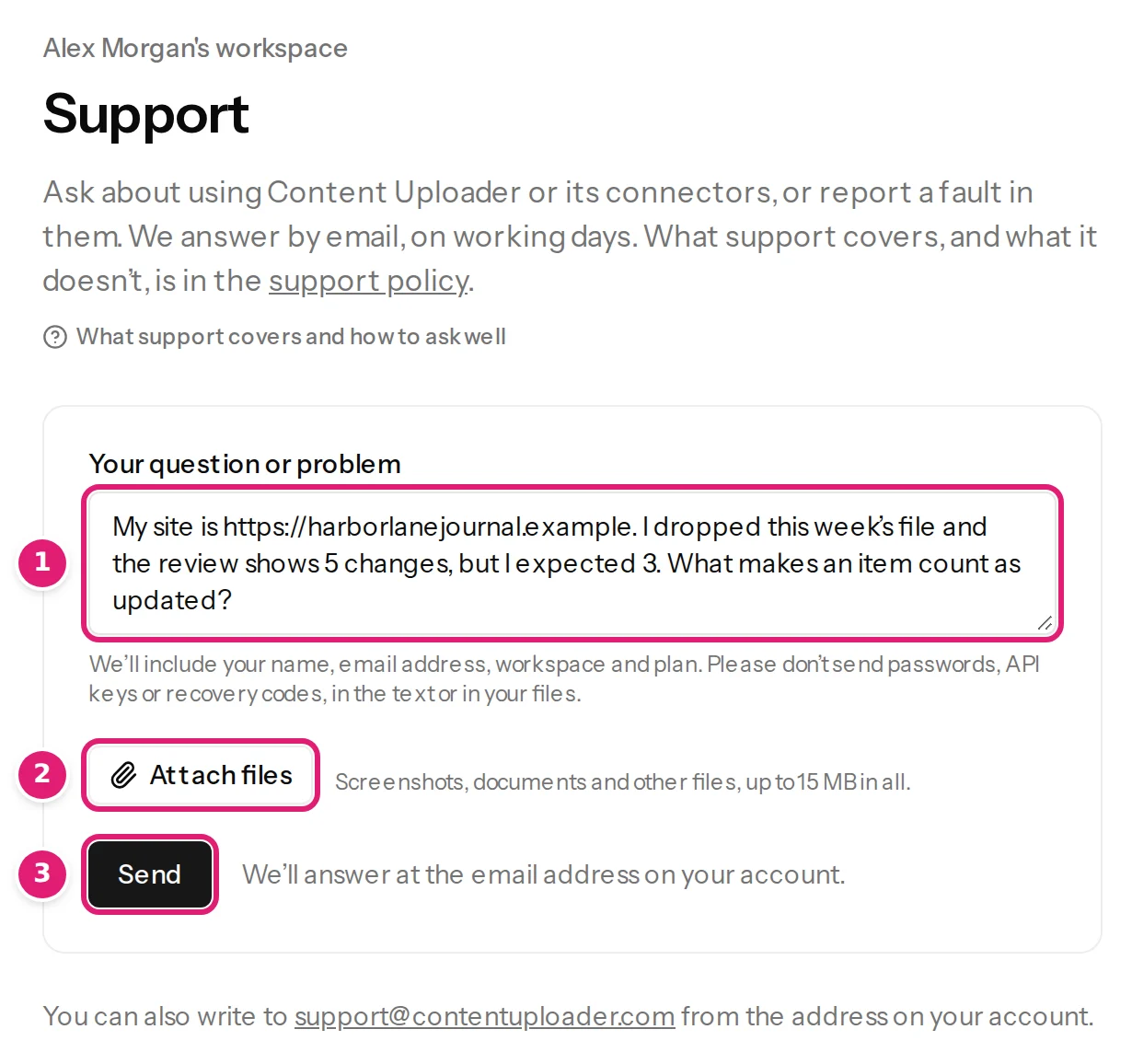
- Open Support and write in Your question or problem (1). Say what you did, what you expected and what happened. The box suggests what helps: the address of your site, the connector and its version, what you did, what you expected and what happened.
- Optionally select Attach files (2) to add screenshots, documents or a small sample file: up to 15 MB in all. Remove a file from the list before sending if you change your mind.
- Select Send (3). You get an answer by email, at the email address of your account.
The message can be up to 5,000 characters. Content Uploader includes your name, email address, workspace and plan, so there is no need to repeat them. Do not send passwords, API keys or recovery codes, in the text or in a file; support never needs them and will not ask for admin access to your site. An account can send up to 20 requests a day.
You can also write to support@contentuploader.com from the address of your account, so that the subscription can be confirmed. These are the only support channels: the feedback form, the general contact address, social media and personal messages are not support requests.
Who gets email support#
Email support comes with the paid plans, for as long as the subscription is active. On the Free plan the Support page says Email support comes with the paid plans and points to the plans: workspaces on the Free plan have this documentation and the public forums.
What to expect#
- Support is in English, handled on working days (Monday to Friday, except public holidays in Malta), and best effort. There is no promised response time and no service level; buying a plan does not create one.
- It is answered by the developer, not by a separate support team. If you have not heard back after a while, reply to your message once as a reminder; more reminders do not speed things up.
- Write one problem per message. A message that grows into several issues may be split.
What support covers#
- Using Content Uploader and its connectors as documented: uploading files, configurations, mappings, previews, publishing and connecting sites.
- Faults in the service or in the connectors. Fixes come in a new version, not as one-off patches.
- Questions about your plan, your invoices and your account.
What it does not cover#
- Doing the work for you: designing configurations, mappings and templates, setting up imports, cleaning or restructuring your files, deciding how your content should be organised. That is consulting, which can be arranged as paid work.
- Your sites and other software: hosting, PHP, web servers, WordPress, Joomla, themes, plugins and other extensions, including how to configure them, and what other software does with content once it is published.
- Advice: legal, tax, search-engine or content advice.
- Features that do not exist. A feature the documentation does not describe is not a fault. Send the idea through the feedback form.
- Your own clients or customers: support is for the members of the subscribed workspace.
The full text is the support policy. To report a security vulnerability, follow the Terms instead.
The feedback form: bugs and ideas#
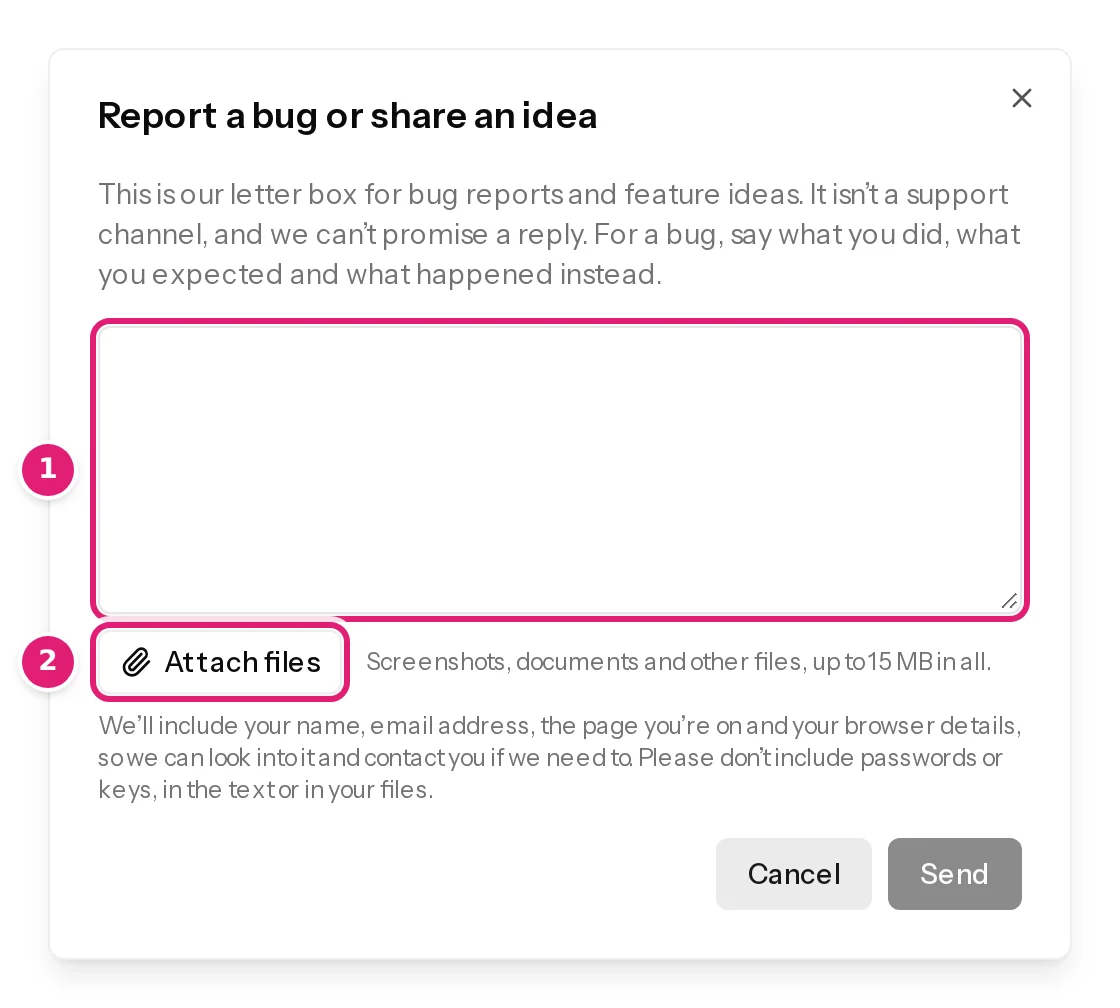
The bug icon at the top of every page opens Report a bug or share an idea. It is a letter box: it reaches the team, but it is not a support channel and a reply is not promised. For a bug, say what you did, what you expected and what happened instead. You can attach files (the same 15 MB), paste a screenshot, and send with Ctrl+Enter. It appears for signed-in people with a confirmed email address, and the page you are on is not changed by sending.
What to include in a request about an import#
A request is answered faster when it has:
- the address of the site and which connector (WordPress plugin or Joomla component) and version it runs: the Sites page shows both;
- the name of the configuration, and the upload, with the Download file link's file or a small sample of it;
- what the review said, ideally with a screenshot of the message and of the row it names;
- for a failed publish, the text from Publishing results or the attempt history.
If your workspace says it is locked or suspended#
The notice carries a reference. Quote it in your message: it tells support which action is meant. See workspaces.
Was this article helpful?
Related articles
- Account and workspacePlans, allowances and what happens at a limitWhat each plan includes, what counts as a record write and as image transfer, when allowances renew, and what the review offers when a file needs more than what is left.
- TroubleshootingThe file cannot be read or is refusedWhat to do when a file is refused on upload or the page says This file could not be processed: every message, its cause and the fix, for spreadsheets, CSV files and ZIPs.
- Account and workspaceWhat Content Uploader keeps, for how long, and how to export or delete itHow long your uploaded files, run history, account data, invitations and billing records are kept, what stays on your websites, and how to ask for an export of your data.
- FAQWhat does support cover?Support covers using Content Uploader and its connectors as documented, faults, and your plan, invoices and account. It does not do the work for you or cover your own sites.